 Rdzleo
c24a9bc162
Rdzleo
c24a9bc162
阶段1: 将 dzbj 项目的 LVGL 8.3.11 LCD 显示集成到 AI小智 主项目,
开机显示 ScreenHome 界面,同时优化配网模式下的内存使用,
确保 WiFi+BLE+LVGL 三者共存运行。

## 新增功能

### dzbj 显示模块集成
- 新增 main/dzbj/ 目录,移植 LCD 驱动(ST77916 QSPI)、触摸驱动(CST816S)、
  LVGL 初始化和 SquareLine Studio UI 界面
- I2C 总线共享:dzbj 触摸控制器复用主项目的 I2C_NUM_1 总线
- GPIO 冲突解决:LED(GPIO21)、Touch1(GPIO1)、Touch4(GPIO7) 改为 NC,
  电池 ADC 从 GPIO6 改为 GPIO3
- 添加 LVGL、esp_lcd_st77916、esp_lcd_touch_cst816s 等组件依赖
- managed_components 纳入版本管理

### 配网模式轻量化启动
- BoxAudioCodec: 新增 output_only 模式,仅创建 I2S TX 通道(省 ~13KB DMA)
  跳过 ES7210 ADC 初始化(省 ~2-4KB)
- AudioCodec: 新增 StartOutputOnly() 方法,仅启用扬声器输出
- Application: 配网模式跳过 Opus 编码器、输入重采样器、协议初始化、
  天气位置检测等网络业务
- 板级构造函数: 配网模式跳过电池检测、IMU传感器、PowerSaveTimer

### WifiBoard 配网流程修复
- NeedsProvisioning() 静态方法: 读取 NVS force_ap 和 SSID 列表,
  用于提前判断配网模式
- force_ap 竞态修复: 构造函数不再清零 force_ap,改在 StartNetwork() 清零,
  确保 NeedsProvisioning() 能正确读到 force_ap=1
- Application 缓存 provisioning_mode_ 成员变量,避免重复读 NVS

### BLE 配网重启修复
- 配网成功后用 esp_timer 延迟重启替代 xTaskCreate,
  避免内存紧张时任务创建失败导致设备不重启
- 注释掉 WiFi 连接成功后的 MAC 地址发送步骤

### sdkconfig 内存优化
- BT_ALLOCATION_FROM_SPIRAM_FIRST=y (BLE 动态分配优先 PSRAM)
- SPIRAM_MALLOC_RESERVE_INTERNAL=32768
- NVS_ALLOCATE_CACHE_IN_SPIRAM=y
- WiFi 静态缓冲区数量优化 (RX=10, TX=8)

Co-Authored-By: Claude Opus 4.6 <noreply@anthropic.com>

Music player demo
Overview
The music player demo shows what kind of modern, smartphone-like user interfaces can be created on LVGL. It works the best with display with 480x272 or 272x480 resolution.
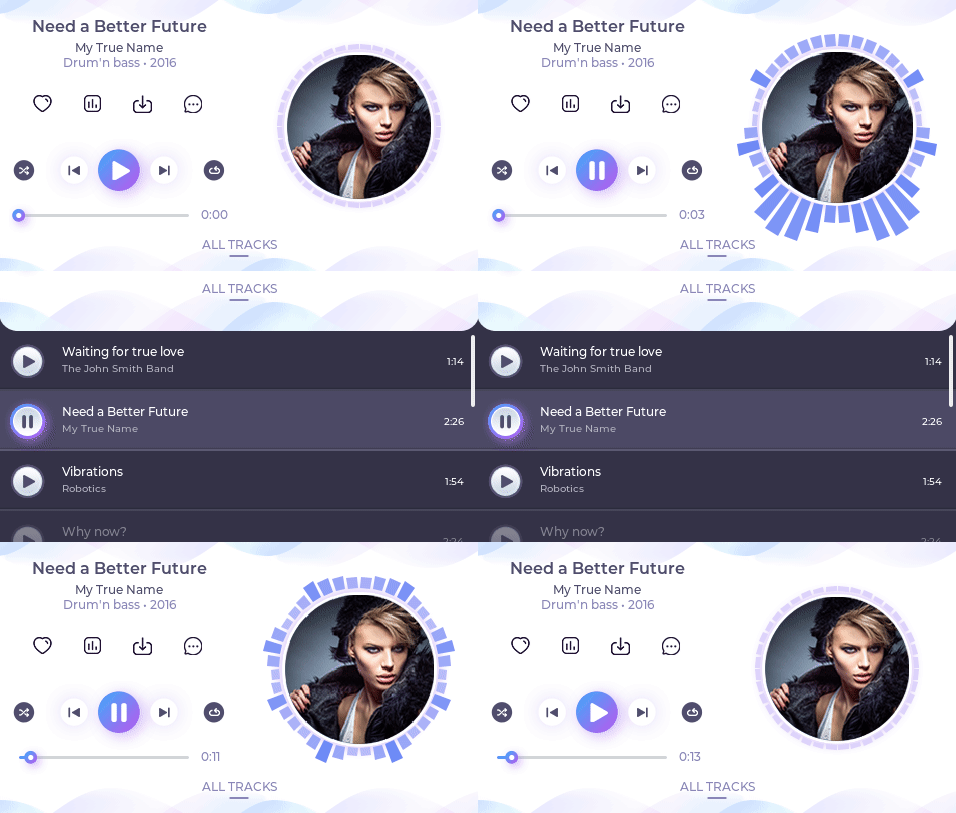
Run the demo
- In
lv_conf.hor equivalent places setLV_USE_DEMO_MUSIC 1 - With
LV_DEMO_MUSIC_AUTO_PLAYenabled a ~60 sec demo will be played. - After
lv_init()and initializing the drivers calllv_demo_music()
How the spectrum animation works
assets/spectrum.pycreates an array of spectrum values from a music. 4 band are created with 33 samples/sec: bass, bass-mid, mid, mid-treble.- The spectrum meter UI does the followings:
- Zoom the album cover proportionality to the current bass value
- Display the 4 bands on the left side of a circle by default at 0°, 45°, 90°, 135°
- Add extra bars next to the "main bars" with a cosine shape. Add more bars for the lower bands.
- If there is a large enough bass, add a random offset to the position of the bars. E.g. start from 63° instead of 0°. (bars greater than 180° start again from 0°)
- If there is no bass, add 1 to the offset of the bars (it creates a "walking" effect)
- Mirror the bars to the right side of the circle
Using spectrum.py
- install
librosawithpip3 install librosa - run
python sectrum.py my_file.mp3 - see the result in
spectrum.h