 Rdzleo
bffd31645e
Rdzleo
bffd31645e
修复 4 个配网模式核心问题, 让 Rtc_AIavatar 分支 (含火山 RTC SDK + 软件 AEC + 完整业务)
能像 adaptation_dzbjImg_shar 一样正常配网, 同时显示居中提示文字.

============ 问题与修复 ============

### 问题 1: 配网模式 BLE 广播 ADV_DATA malloc 失败 (手机搜不到设备)

  日志:
    E (3731) BLE_INIT: Malloc failed
    E (3731) BT_HCI: CC evt: op=0x2008 (HCI_BLE_WRITE_ADV_DATA), status=0x7
    I (3731) BluetoothProvisioning: ✅ 广播启动成功  (假成功, 广播数据空)

  根因:
    Rtc_AIavatar 比 adaptation_dzbjImg_shar 多 ~50-80 KB DRAM 业务 .bss
      (软件 AEC + HTTPS 完整状态机 + dialog watchdog + 完整 RTC 状态),
    + 火山 RTC SDK 静态库 .bss ~30-50 KB (g_cnxMgr 14.6KB, ack$14 12.6KB 等),
    配网模式时 BLE Bluedroid stack 抢不到广播数据 malloc 所需的 ~10KB DRAM.

  修复 (前次 commit 已做): sdkconfig 关闭 BLE 5.0 6 个特性 (项目实际只用 4.2 legacy),
    省 ~15 KB controller DRAM, 广播数据 malloc 成功.

### 问题 2: 配网模式下 LCD 绘制跟 WiFi/BLE 初始化抢 DRAM 导致 reboot

  日志:
    E (1200) wifi:Expected to init 10 rx buffer, actual is 1
    E (1220) BluetoothProvisioning: WiFi初始化失败: ESP_ERR_NO_MEM
    assert failed: vQueueDelete queue.c:2355 (pxQueue) ← BLE GATT fixed_queue_new 失败 → 反向清理 NULL 队列

  排查路径 (失败方案记录):
    - esp_lcd_panel_draw_bitmap 一次画 360x360 (253KB): SPI queue 满, 下半屏未画 + DRAM 抢 WiFi
    - 分块画 (60 行/块) + vTaskDelay 块间: SPI driver 内部 queue 持续保留 DRAM, 仍然抢
    - 强制 codec output_only=false 完整 duplex: 多 15KB DRAM, BLE BTU_StartUp malloc 失败 reboot
    - CONFIG_BT_BLE_DYNAMIC_ENV_MEMORY=y: 引入 BTU bt_workqueue 分配失败 → vQueueDelete NULL → assert

  修复 (本次 commit): EAF 最小化初始化
    movecall_moji_esp32s3.cc 配网模式调用新增的 ai_chat_screen_init_provisioning(),
    跳过 8 张 EAF 资源加载 (省 4.32 MB PSRAM + ~10KB DRAM), 跳过数字人 anim,
    只启用 gfx_emote renderer + 单个 gfx_label, flush buffer 启动时预分配 (~30KB DRAM 一次到位),
    跟 BLE 初始化不再有动态分配冲突. 跟 adaptation_dzbjImg_shar 用 LVGL 显示 GIF 同思路,
    用 EAF 替代 LVGL 避免引入 50-80KB LVGL .bss.

### 问题 3: 配网模式音效不播放

  根因:
    ResetWifiConfiguration 由 BOOT 按键 OnClick 调用, 跑在 esp_timer task 上下文,
    vTaskDelay(4000ms) 实测只等了 1.1 秒就被唤醒, 音效没播完就 esp_restart.

  修复 (前次 commit 已做): 派发到独立 task 跑 PlaySound + vTaskDelay + esp_restart,
    独立 task 中 vTaskDelay 正常工作, 等 4 秒确保 解码 + DMA + 功放尾音完整.

### 问题 4: 配网时屏幕黑屏 (UX 不友好)

  实施: ai_chat_screen_init_provisioning("请使用APP\n蓝牙配网~")
    LCD 黑底白字居中显示提示文字, 用户感知"配网中".
    label height=64 (恰好包 2 行 + 余白), GFX_ALIGN_CENTER 上下左右居中.

============ 文件改动 ============

  main/application.cc:
    Application 构造时显式注释: 不能在配网模式置 background_task_=nullptr
    (OnAudioOutput 无判空, 会 std::mutex::lock 异常 abort).

  main/boards/common/wifi_board.cc:
    ResetWifiConfiguration 派发独立 task 跑 PlaySound + 4s delay + esp_restart,
    EnterWifiConfigMode BLE 启动后早 return (StartBleProvisioning 内部已 Alert 音效).

  main/boards/movecall-moji-esp32s3/movecall_moji_esp32s3.cc:
    AI 对话模式分支: 配网时调 ai_chat_screen_init_provisioning() 显示文字,
    正常模式调 ai_chat_screen_init() 显示数字人.

  main/dzbj/ai_chat_ui.h:
    新增 ai_chat_screen_init_provisioning(const char* hint_text) 声明.

  main/dzbj/ai_chat_ui_eaf.c:
    新增 ai_chat_screen_init_provisioning() 实现, EAF 最小化路径:
      gfx_emote_init + gfx_disp_add + 单 label 显示文字, 跳过 EAF 资源/anim/背景图.

============ 测试结果 (设备实测) ============
  - 按 BOOT 触发配网: 听到完整配网音效 (P3_LALA_WIFICONFIG 约 1 秒)
  - 设备重启 → 配网模式启动 → LCD 显示"请使用APP\n蓝牙配网~" 居中
  - 手机能搜到 Airhub_d0:cf:13:03:bb:f2 → 能连接 → 配网完成
  - 配网完成重启 → 正常模式数字人 + RTC 对话功能正常

Co-Authored-By: Claude Opus 4.7 (1M context) <noreply@anthropic.com>
XiaoZhi AI Chatbot
Introduction
👉 Build your AI chat companion with ESP32+SenseVoice+Qwen72B!【bilibili】
👉 Equipping XiaoZhi with DeepSeek's smart brain【bilibili】
👉 Build your own AI companion, a beginner's guide【bilibili】
Project Purpose
This is an open-source project released under the MIT license, allowing anyone to use it freely, including for commercial purposes.
Through this project, we aim to help more people get started with AI hardware development and understand how to implement rapidly evolving large language models in actual hardware devices. Whether you're a student interested in AI or a developer exploring new technologies, this project offers valuable learning experiences.
Everyone is welcome to participate in the project's development and improvement. If you have any ideas or suggestions, please feel free to raise an Issue or join the chat group.
Learning & Discussion QQ Group: 376893254
Implemented Features
- Wi-Fi / ML307 Cat.1 4G
- BOOT button wake-up and interruption, supporting both click and long-press triggers
- Offline voice wake-up ESP-SR
- Streaming voice dialogue (WebSocket or UDP protocol)
- Support for 5 languages: Mandarin, Cantonese, English, Japanese, Korean SenseVoice
- Voice print recognition to identify who's calling AI's name 3D Speaker
- Large model TTS (Volcano Engine or CosyVoice)
- Large Language Models (Qwen, DeepSeek, Doubao)
- Configurable prompts and voice tones (custom characters)
- Short-term memory, self-summarizing after each conversation round
- OLED / LCD display showing signal strength or conversation content
- Support for LCD image expressions
- Multi-language support (Chinese, English)
Hardware Section
Breadboard DIY Practice
See the Feishu document tutorial:
👉 XiaoZhi AI Chatbot Encyclopedia
Breadboard demonstration:
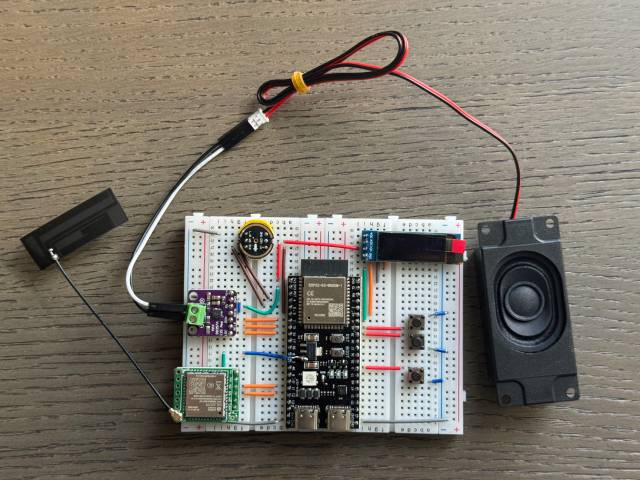
Supported Open Source Hardware
- LiChuang ESP32-S3 Development Board
- Espressif ESP32-S3-BOX3
- M5Stack CoreS3
- AtomS3R + Echo Base
- AtomMatrix + Echo Base
- Magic Button 2.4
- Waveshare ESP32-S3-Touch-AMOLED-1.8
- LILYGO T-Circle-S3
- XiaGe Mini C3
- Moji XiaoZhi AI Derivative Version
- CuiCan AI pendant
- WMnologo-Xingzhi-1.54TFT
- SenseCAP Watcher


Firmware Section
Flashing Without Development Environment
For beginners, it's recommended to first use the firmware that can be flashed without setting up a development environment.
The firmware connects to the official xiaozhi.me server by default. Currently, personal users can register an account to use the Qwen real-time model for free.
👉 Flash Firmware Guide (No IDF Environment)
Development Environment
- Cursor or VSCode
- Install ESP-IDF plugin, select SDK version 5.3 or above
- Linux is preferred over Windows for faster compilation and fewer driver issues
- Use Google C++ code style, ensure compliance when submitting code
Developer Documentation
- Board Customization Guide - Learn how to create custom board adaptations for XiaoZhi
- IoT Control Module - Understand how to control IoT devices through AI voice commands
AI Agent Configuration
If you already have a XiaoZhi AI chatbot device, you can configure it through the xiaozhi.me console.
👉 Backend Operation Tutorial (Old Interface)
Technical Principles and Private Deployment
👉 Detailed WebSocket Communication Protocol Documentation
For server deployment on personal computers, refer to another MIT-licensed project xiaozhi-esp32-server