 Rdzleo
ce7a3aad63
Rdzleo
ce7a3aad63
按 GSD 框架 .planning/milestones/digital_human_rtc/phases/phase_02_partition_resize/
规划完成 Phase 2 分区表调整,为 Phase 3 数字人 GIF 资源扩容铺路。

## 分区表变更

| 分区 | 旧 | 新 | 变化 |
|------|-----|-----|------|
| model | 0x10000 / 64KB | — 已移除 | -64KB |
| ota_0 | 0x20000 / 6.5MB | 0x10000 / 5.5MB | -1MB |
| ota_1 | 0x6A0000 / 6.5MB | 0x590000 / 5.5MB | -1MB |
| storage | 0xD20000 / 2.875MB | 0xB10000 / 4.9375MB | +2.0625MB |

合计:16MB(不变),SPIFFS 净扩容 2.0625MB

## 决策依据

- 当前 =n 固件 4.63MB,5.5MB ota 留 19% 成长 buffer
- SPIFFS 4.9MB 为 3 个 hiyori GIF + 背景图扩容(Phase 3 预算 ~3.9MB)
- 移除未使用的 64KB model 分区
- NVS 分区位置/大小不变,WiFi 凭据等数据完整保留

## 验收结果(详见 PARTITION_REPORT.md)

- =n 编译:✅ kapi.bin 4.63MB ≤ 5.5MB ota_0
- =y 双模式编译:链接通过但 6.05MB > 5.5MB ota(**预期降级**,
  数字人 RTC 单一形态只用 =n 固件,Phase 3 资源精简后或可恢复)
- 烧录运行时验证:
  ✅ Running partition: ota_0
  ✅ NVS 数据完整保留(WiFi 凭据/设备配置)
  ✅ SPIFFS 自动挂载,hiyori_m05.gif 加载成功
  ✅ AI 对话模式启动,Codec 工作,WiFi 连接,RTC WebSocket 协议初始化
  ✅ free_heap=5.2MB(无 regression)

## GSD 文档(同时提交)

- .planning/milestones/digital_human_rtc/phases/phase_02_partition_resize/PLAN.md
- .planning/milestones/digital_human_rtc/phases/phase_02_partition_resize/PARTITION_REPORT.md
XiaoZhi AI Chatbot
Introduction
👉 Build your AI chat companion with ESP32+SenseVoice+Qwen72B!【bilibili】
👉 Equipping XiaoZhi with DeepSeek's smart brain【bilibili】
👉 Build your own AI companion, a beginner's guide【bilibili】
Project Purpose
This is an open-source project released under the MIT license, allowing anyone to use it freely, including for commercial purposes.
Through this project, we aim to help more people get started with AI hardware development and understand how to implement rapidly evolving large language models in actual hardware devices. Whether you're a student interested in AI or a developer exploring new technologies, this project offers valuable learning experiences.
Everyone is welcome to participate in the project's development and improvement. If you have any ideas or suggestions, please feel free to raise an Issue or join the chat group.
Learning & Discussion QQ Group: 376893254
Implemented Features
- Wi-Fi / ML307 Cat.1 4G
- BOOT button wake-up and interruption, supporting both click and long-press triggers
- Offline voice wake-up ESP-SR
- Streaming voice dialogue (WebSocket or UDP protocol)
- Support for 5 languages: Mandarin, Cantonese, English, Japanese, Korean SenseVoice
- Voice print recognition to identify who's calling AI's name 3D Speaker
- Large model TTS (Volcano Engine or CosyVoice)
- Large Language Models (Qwen, DeepSeek, Doubao)
- Configurable prompts and voice tones (custom characters)
- Short-term memory, self-summarizing after each conversation round
- OLED / LCD display showing signal strength or conversation content
- Support for LCD image expressions
- Multi-language support (Chinese, English)
Hardware Section
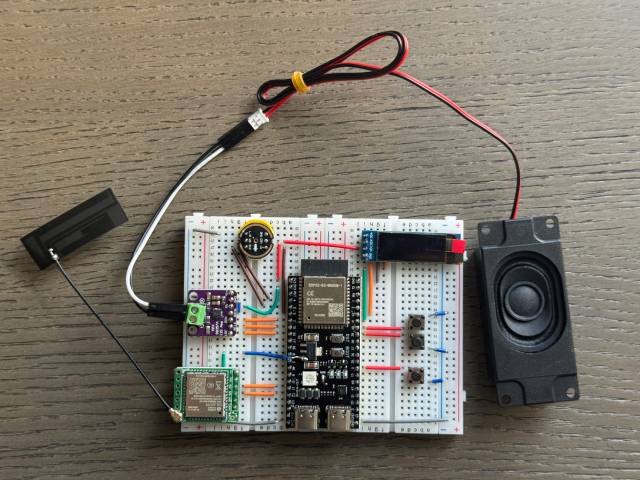
Breadboard DIY Practice
See the Feishu document tutorial:
👉 XiaoZhi AI Chatbot Encyclopedia
Breadboard demonstration:
Supported Open Source Hardware
- LiChuang ESP32-S3 Development Board
- Espressif ESP32-S3-BOX3
- M5Stack CoreS3
- AtomS3R + Echo Base
- AtomMatrix + Echo Base
- Magic Button 2.4
- Waveshare ESP32-S3-Touch-AMOLED-1.8
- LILYGO T-Circle-S3
- XiaGe Mini C3
- Moji XiaoZhi AI Derivative Version
- CuiCan AI pendant
- WMnologo-Xingzhi-1.54TFT
- SenseCAP Watcher


Firmware Section
Flashing Without Development Environment
For beginners, it's recommended to first use the firmware that can be flashed without setting up a development environment.
The firmware connects to the official xiaozhi.me server by default. Currently, personal users can register an account to use the Qwen real-time model for free.
👉 Flash Firmware Guide (No IDF Environment)
Development Environment
- Cursor or VSCode
- Install ESP-IDF plugin, select SDK version 5.3 or above
- Linux is preferred over Windows for faster compilation and fewer driver issues
- Use Google C++ code style, ensure compliance when submitting code
Developer Documentation
- Board Customization Guide - Learn how to create custom board adaptations for XiaoZhi
- IoT Control Module - Understand how to control IoT devices through AI voice commands
AI Agent Configuration
If you already have a XiaoZhi AI chatbot device, you can configure it through the xiaozhi.me console.
👉 Backend Operation Tutorial (Old Interface)
Technical Principles and Private Deployment
👉 Detailed WebSocket Communication Protocol Documentation
For server deployment on personal computers, refer to another MIT-licensed project xiaozhi-esp32-server