 Rdzleo
eceadda807
Rdzleo
eceadda807
完成数字人模式 UI 的"背景图叠加 + 实时字幕"功能。所有改动基于 EAF
框架(Phase 10 commit 31982ba),保持 0 个 lv_* UI 函数链接进固件。

Step 1: JPG 背景图叠加
- ai_chat_ui_eaf.c 加 esp_jpeg 解码 Background_360x360.jpg →
  RGB565 buffer (252KB PSRAM) → gfx_img_create 作为底层
- z-index 通过创建顺序控制: 背景 → 数字人 anim → 字幕 label
- 选项 A 保留 JPG (~20KB SPIFFS) 比选项 B (252KB .bin) 省 232KB

数字人透明: esp_emote_gfx local patch (gfx_anim.c::gfx_anim_render_24bit_pixels)
- 根因: 在线 EAF Packer 默认导出 24-bit 模式,工具不暴露 bit_depth
  选项,alpha 滑块拉到 0 无法保存,导致 GIF 透明像素被烘焙成屏幕背景
  色 (黑色 RGB888 #000000)
- 解决: 在 24-bit 渲染函数加 chroma key,跳过近黑像素让背景图露出
- 阈值演化 v1 (0x0000) → v3 (16) → v4 (24),最终 RGB888 ≤ (24,24,24)
- 保留 R/G/B AND 关系(三分量都小才透明),保护数字人本体暗色不破洞
- 双字节序判定,兼容 disp_config_t.flags.swap = true

Step 2: 中文字幕 (gfx_label + LVGL bitmap font 方案 A)
- 字体方案对比 3 方案后选方案 A(C 数组 XIP from Flash):
  • A: 1.4MB Flash + 0 RAM (推荐)
  • B: xiaozhi-fonts .bin 1.18MB SPIFFS + 1.18MB PSRAM
  • C: 自转 .bin ~2.8MB 总占用
- extern const lv_font_t font_puhui_20_4 → gfx_label_set_font 直接喂
- linker 副作用: 仅引入 7 个 LVGL 函数 ~2.2KB(lv_font_get_bitmap_fmt_txt
  / lv_mem_* 幽灵符号),无 lv_obj/lv_disp/lv_indev 等 UI 框架函数
- 字幕参数: 300×56 (2 行限制) + 行间距 4 + 贴底 y_ofs=-4
- GFX_LABEL_LONG_WRAP 字符级断行(中文友好),CENTER 居中
- 流式 TTS 节流 50ms(比 LVGL 100ms 短,EAF 渲染更快)

工具脚本 (tools/patch_eaf_transparency.py)
- 探索性脚本:解析 hiyori-assets.bin 尝试修补 EAF palette alpha
- 实际未生效(工具导出 24-bit 无 palette),保留作为 EAF bin layout
  解析参考

固件大小: 2.75MB → 4.30MB(+1.55MB = 字体 1.4MB + 字幕代码 + 背景图代码)
分区余量: 50% → 25% (1.42MB 空闲,安全)

完整踩坑经验已沉淀到 ~/.claude/CLAUDE.md §13 + 项目 memory。

Co-Authored-By: Claude Opus 4.7 (1M context) <noreply@anthropic.com>
XiaoZhi AI Chatbot
Introduction
👉 Build your AI chat companion with ESP32+SenseVoice+Qwen72B!【bilibili】
👉 Equipping XiaoZhi with DeepSeek's smart brain【bilibili】
👉 Build your own AI companion, a beginner's guide【bilibili】
Project Purpose
This is an open-source project released under the MIT license, allowing anyone to use it freely, including for commercial purposes.
Through this project, we aim to help more people get started with AI hardware development and understand how to implement rapidly evolving large language models in actual hardware devices. Whether you're a student interested in AI or a developer exploring new technologies, this project offers valuable learning experiences.
Everyone is welcome to participate in the project's development and improvement. If you have any ideas or suggestions, please feel free to raise an Issue or join the chat group.
Learning & Discussion QQ Group: 376893254
Implemented Features
- Wi-Fi / ML307 Cat.1 4G
- BOOT button wake-up and interruption, supporting both click and long-press triggers
- Offline voice wake-up ESP-SR
- Streaming voice dialogue (WebSocket or UDP protocol)
- Support for 5 languages: Mandarin, Cantonese, English, Japanese, Korean SenseVoice
- Voice print recognition to identify who's calling AI's name 3D Speaker
- Large model TTS (Volcano Engine or CosyVoice)
- Large Language Models (Qwen, DeepSeek, Doubao)
- Configurable prompts and voice tones (custom characters)
- Short-term memory, self-summarizing after each conversation round
- OLED / LCD display showing signal strength or conversation content
- Support for LCD image expressions
- Multi-language support (Chinese, English)
Hardware Section
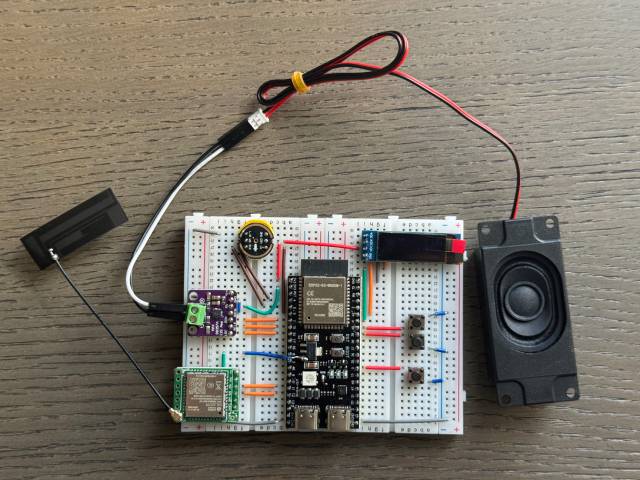
Breadboard DIY Practice
See the Feishu document tutorial:
👉 XiaoZhi AI Chatbot Encyclopedia
Breadboard demonstration:
Supported Open Source Hardware
- LiChuang ESP32-S3 Development Board
- Espressif ESP32-S3-BOX3
- M5Stack CoreS3
- AtomS3R + Echo Base
- AtomMatrix + Echo Base
- Magic Button 2.4
- Waveshare ESP32-S3-Touch-AMOLED-1.8
- LILYGO T-Circle-S3
- XiaGe Mini C3
- Moji XiaoZhi AI Derivative Version
- CuiCan AI pendant
- WMnologo-Xingzhi-1.54TFT
- SenseCAP Watcher


Firmware Section
Flashing Without Development Environment
For beginners, it's recommended to first use the firmware that can be flashed without setting up a development environment.
The firmware connects to the official xiaozhi.me server by default. Currently, personal users can register an account to use the Qwen real-time model for free.
👉 Flash Firmware Guide (No IDF Environment)
Development Environment
- Cursor or VSCode
- Install ESP-IDF plugin, select SDK version 5.3 or above
- Linux is preferred over Windows for faster compilation and fewer driver issues
- Use Google C++ code style, ensure compliance when submitting code
Developer Documentation
- Board Customization Guide - Learn how to create custom board adaptations for XiaoZhi
- IoT Control Module - Understand how to control IoT devices through AI voice commands
AI Agent Configuration
If you already have a XiaoZhi AI chatbot device, you can configure it through the xiaozhi.me console.
👉 Backend Operation Tutorial (Old Interface)
Technical Principles and Private Deployment
👉 Detailed WebSocket Communication Protocol Documentation
For server deployment on personal computers, refer to another MIT-licensed project xiaozhi-esp32-server