 |
|
 |
|
 Atomgit
Atomgit
简体中文 | 繁體中文 | English | ไทย | Tiếng Việt | 日本語 | Русский
 # Toonflow
AI Short Drama Factory
With a tap, novels instantly become episodes!
AI scripts × AI visuals × Turbo generation 🔥



 ---
# 🚀 Installation
## Prerequisites
Before installing and using this software, please prepare the following:
- ✅ Large language model AI service API address
- ✅ Sora or Doubao video service API address
- ✅ Nano Banana Pro image generation model service API
## Local Installation
### 1. Download & Install
| Operating System | GitHub | Atomgit | Quark Cloud Download | Description |
| :--------------: | :------------------------------------------------------ | :---------------------------------------------------- | :------------------------------------------------------ | :-------------------- |
| Windows | [Release](https://github.com/HBAI-Ltd/Toonflow-app/releases) | [Release](https://gitcode.com/HBAI-Ltd/Toonflow-app/releases) | [Quark Cloud](https://pan.quark.cn/s/94ef07509df0) | Official release package |
| Linux | [Release](https://github.com/HBAI-Ltd/Toonflow-app/releases) | [Release](https://gitcode.com/HBAI-Ltd/Toonflow-app/releases) | [Quark Cloud](https://pan.quark.cn/s/94ef07509df0) | Official release package |
| macOS | [Release](https://github.com/HBAI-Ltd/Toonflow-app/releases) | [Release](https://gitcode.com/HBAI-Ltd/Toonflow-app/releases) | [Quark Cloud](https://pan.quark.cn/s/94ef07509df0) | Official release package |
> [!CAUTION]
> On MacOS, please go to Settings - Privacy & Security to configure security settings, otherwise, you may not be able to open the app due to certificate issues.
>
> See Zhihu documentation: [https://www.zhihu.com/question/433389276](https://www.zhihu.com/question/433389276)
> Due to Gitee OS environment and Release file upload size limits, Gitee Release download is currently not available.
### 2. Start Service
After installation, launch the program to start using this service.
> ⚠️ **First-time Login**
> Username: `admin`
> Password: `admin123`
## Docker Deployment
### Prerequisites
- [Docker](https://docs.docker.com/get-docker/) installed (version 20.10+)
### Method 1: Online Deployment
To be developed; please use local build for now.
### Method 2: Local Build
Build directly from local source code, suitable for developers or users who have cloned the repo; requires Git installed locally:
```shell
# Clone the project (skip if already cloned)
git clone https://github.com/HBAI-Ltd/Toonflow-app.git
cd Toonflow-app
# Build and start locally with docker-compose
yarn docker:local
# Or build manually
docker build -t toonflow .
docker run -d -p
---
# 🚀 Installation
## Prerequisites
Before installing and using this software, please prepare the following:
- ✅ Large language model AI service API address
- ✅ Sora or Doubao video service API address
- ✅ Nano Banana Pro image generation model service API
## Local Installation
### 1. Download & Install
| Operating System | GitHub | Atomgit | Quark Cloud Download | Description |
| :--------------: | :------------------------------------------------------ | :---------------------------------------------------- | :------------------------------------------------------ | :-------------------- |
| Windows | [Release](https://github.com/HBAI-Ltd/Toonflow-app/releases) | [Release](https://gitcode.com/HBAI-Ltd/Toonflow-app/releases) | [Quark Cloud](https://pan.quark.cn/s/94ef07509df0) | Official release package |
| Linux | [Release](https://github.com/HBAI-Ltd/Toonflow-app/releases) | [Release](https://gitcode.com/HBAI-Ltd/Toonflow-app/releases) | [Quark Cloud](https://pan.quark.cn/s/94ef07509df0) | Official release package |
| macOS | [Release](https://github.com/HBAI-Ltd/Toonflow-app/releases) | [Release](https://gitcode.com/HBAI-Ltd/Toonflow-app/releases) | [Quark Cloud](https://pan.quark.cn/s/94ef07509df0) | Official release package |
> [!CAUTION]
> On MacOS, please go to Settings - Privacy & Security to configure security settings, otherwise, you may not be able to open the app due to certificate issues.
>
> See Zhihu documentation: [https://www.zhihu.com/question/433389276](https://www.zhihu.com/question/433389276)
> Due to Gitee OS environment and Release file upload size limits, Gitee Release download is currently not available.
### 2. Start Service
After installation, launch the program to start using this service.
> ⚠️ **First-time Login**
> Username: `admin`
> Password: `admin123`
## Docker Deployment
### Prerequisites
- [Docker](https://docs.docker.com/get-docker/) installed (version 20.10+)
### Method 1: Online Deployment
To be developed; please use local build for now.
### Method 2: Local Build
Build directly from local source code, suitable for developers or users who have cloned the repo; requires Git installed locally:
```shell
# Clone the project (skip if already cloned)
git clone https://github.com/HBAI-Ltd/Toonflow-app.git
cd Toonflow-app
# Build and start locally with docker-compose
yarn docker:local
# Or build manually
docker build -t toonflow .
docker run -d -p  ---
# 💌 Contact Us
📧 Email: [ltlctools@outlook.com](mailto:ltlctools@outlook.com?subject=Toonflow inquiry)
---
# 📜 License
Toonflow is open source under Apache-2.0 with a supplementary commercial agreement.
License details: https://www.apache.org/licenses/LICENSE-2.0
## Supplementary Agreement
- If you distribute this software as a product to **2 or more independent third parties**, you must obtain **written commercial authorization** from HBAI-Ltd.
- **≤ 5 legal entities** operating jointly for internal use without providing services externally are considered **internal use and require no authorization**.
- You may not remove or modify any trademarks, logos, or copyright notices in Toonflow.
## Always Free — No Authorization Required
- ✅ Using Toonflow to produce content and earn platform revenue shares
- ✅ Secondary development for internal team use
- ✅ ≤ 5 legal entities operating jointly, internally only
- ✅ Personal learning, research, and non-commercial purposes
## Licensing Pricing
| Stage | Annual Revenue | Annual Fee |
|------|---------|------|
| 🌱 Nurture | < $10k | **Free** |
| 🚀 Startup | $10k–$50k | ¥5,000/year |
| 📈 Growth | $50k–$150k | ¥20,000/year |
| 🏢 Scale | $150k–$500k | ¥80,000/year |
| 🌐 Enterprise | > $500k | Negotiable |
> **Non-Retroactivity Clause**: Users who used Toonflow under AGPL-3.0 prior to the v1.0.8 release are not affected by this change. Their existing usage continues under AGPL-3.0.
See the full [LICENSE](../LICENSE) file for details.
---
# ⭐️ Star History
[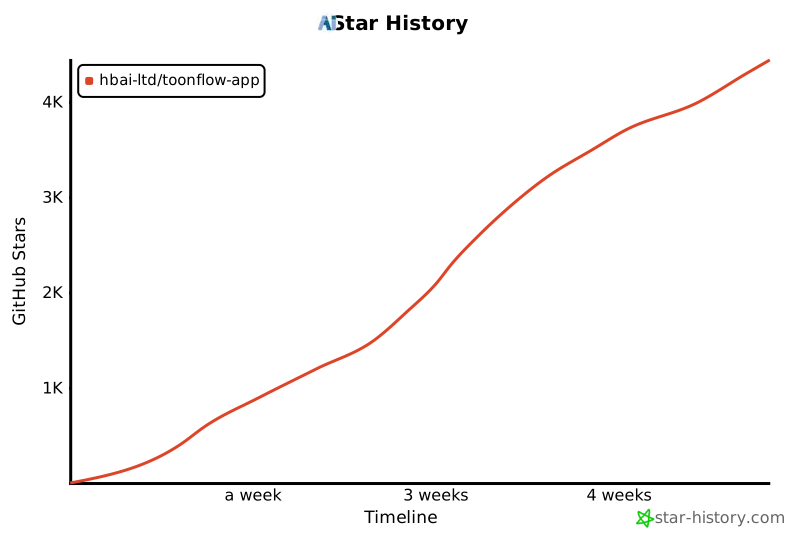](https://www.star-history.com/#HBAI-Ltd/Toonflow-app&type=timeline&legend=top-left)
---
# 🙏 Thanks
Thank you to the following open-source projects for supporting Toonflow:
- [Express](https://expressjs.com/) - Fast, open, minimalist Node.js Web framework
- [AI SDK](https://ai-sdk.dev/) - TypeScript-first AI toolkit
- [Better-SQLite3](https://github.com/WiseLibs/better-sqlite3) - High-performance SQLite3 bindings
- [Sharp](https://sharp.pixelplumbing.com/) - High-performance Node.js image toolkit
- [Axios](https://axios-http.com/) - Promise-based HTTP client
- [Zod](https://zod.dev/) - TypeScript-first schema validation library
- [Socket.IO](https://socket.io/) - Real-time bidirectional event framework
- [Electron](https://www.electronjs.org/) - Cross-platform desktop app framework
- [Hugging Face Transformers](https://huggingface.co./transformers.js) - Local ML inference library
Thanks to the following organizations/individuals for their support:
---
# 💌 Contact Us
📧 Email: [ltlctools@outlook.com](mailto:ltlctools@outlook.com?subject=Toonflow inquiry)
---
# 📜 License
Toonflow is open source under Apache-2.0 with a supplementary commercial agreement.
License details: https://www.apache.org/licenses/LICENSE-2.0
## Supplementary Agreement
- If you distribute this software as a product to **2 or more independent third parties**, you must obtain **written commercial authorization** from HBAI-Ltd.
- **≤ 5 legal entities** operating jointly for internal use without providing services externally are considered **internal use and require no authorization**.
- You may not remove or modify any trademarks, logos, or copyright notices in Toonflow.
## Always Free — No Authorization Required
- ✅ Using Toonflow to produce content and earn platform revenue shares
- ✅ Secondary development for internal team use
- ✅ ≤ 5 legal entities operating jointly, internally only
- ✅ Personal learning, research, and non-commercial purposes
## Licensing Pricing
| Stage | Annual Revenue | Annual Fee |
|------|---------|------|
| 🌱 Nurture | < $10k | **Free** |
| 🚀 Startup | $10k–$50k | ¥5,000/year |
| 📈 Growth | $50k–$150k | ¥20,000/year |
| 🏢 Scale | $150k–$500k | ¥80,000/year |
| 🌐 Enterprise | > $500k | Negotiable |
> **Non-Retroactivity Clause**: Users who used Toonflow under AGPL-3.0 prior to the v1.0.8 release are not affected by this change. Their existing usage continues under AGPL-3.0.
See the full [LICENSE](../LICENSE) file for details.
---
# ⭐️ Star History
[](https://www.star-history.com/#HBAI-Ltd/Toonflow-app&type=timeline&legend=top-left)
---
# 🙏 Thanks
Thank you to the following open-source projects for supporting Toonflow:
- [Express](https://expressjs.com/) - Fast, open, minimalist Node.js Web framework
- [AI SDK](https://ai-sdk.dev/) - TypeScript-first AI toolkit
- [Better-SQLite3](https://github.com/WiseLibs/better-sqlite3) - High-performance SQLite3 bindings
- [Sharp](https://sharp.pixelplumbing.com/) - High-performance Node.js image toolkit
- [Axios](https://axios-http.com/) - Promise-based HTTP client
- [Zod](https://zod.dev/) - TypeScript-first schema validation library
- [Socket.IO](https://socket.io/) - Real-time bidirectional event framework
- [Electron](https://www.electronjs.org/) - Cross-platform desktop app framework
- [Hugging Face Transformers](https://huggingface.co./transformers.js) - Local ML inference library
Thanks to the following organizations/individuals for their support:

|
SophNet Cloud provides computing power sponsorship [Official Website] |