 |
|

中文 | English
 # Toonflow
AI Short Drama Factory
Turn novels into episodes with a tap!
AI Script × AI Imagery × Lightning-fast Generation 🔥



 ---
# 🚀 Installation
## Prerequisites
Before installing and using this software, please prepare the following:
- ✅ Large Language Model AI service endpoint.
- ✅ Sora or Doubao video service endpoint
- ✅ Nano Banana Pro image generation model service endpoint
## Local Installation
### 1. Download & Install
| Operating System | GitHub Download | 123YunPan Download | Description |
| :--------------: | :---------------------------------------------------------- | :-------------------------------------------------------- | :---------------------------------------------------------- |
| Windows | [Release](https://github.com/HBAI-Ltd/Toonflow-app/releases) | [123YunPan](https://www.123865.com/s/bkn5Vv-E67cv) | Official release installation package |
| Linux | ⚙️ Coming soon | ⚙️ Coming soon | To be released soon |
| macOS | ⚙️ Coming soon | ⚙️ Coming soon | To be released soon |
> ⚠️ If 123YunPan prompts for payment, it is only due to bandwidth limitations. This software is completely open-source and free.
> Currently, only the Windows version is supported. Other systems will be released gradually.
> Due to Gitee OS environment and file size restrictions for Release uploads, Gitee Release download links are not provided for now.
### 2. Launch the Service
After installation, start the program to use the service.
> ⚠️ **First login**
> Account: `admin`
> Password: `admin123`
## Cloud Deployment
### I. Server Requirements
- **OS**: Ubuntu 20.04+ / CentOS 7+
- **Node.js**: 23.11.1+
- **RAM**: 1GB+
### II. Server Deployment
#### 1. Install the Environment
```bash
# Install Node.js
curl -o- https://raw.githubusercontent.com/nvm-sh/nvm/v0.39.7/install.sh | bash
source ~/.bashrc
nvm install 24
# Install Yarn & PM2
npm install -g yarn pm2
```
#### 2. Deploy the Project
**Clone from GitHub:**
```bash
cd /opt
git clone https://github.com/HBAI-Ltd/Toonflow-app.git
cd Toonflow-app
yarn install
yarn build
```
**Clone from Gitee (recommended in China):**
```bash
cd /opt
git clone https://gitee.com/HBAI-Ltd/Toonflow-app.git
cd Toonflow-app
yarn install
yarn build
```
#### 3. Configure PM2
Create a `pm2.json` file:
```json
{
"name": "toonflow-app",
"script": "build/app.js",
"instances": "max",
"exec_mode": "cluster",
"env": {
"NODE_ENV": "prod",
"PORT": 60000,
"OSSURL": "http://127.0.0.1:60000/"
}
}
```
**Environment Variable Description:**
| Variable | Description |
| ------------ | ------------------------------------------- |
| `NODE_ENV` | Runtime environment, `prod` means production|
| `PORT` | Service listening port |
| `OSSURL` | File storage access address for static files|
---
#### 4. Start the Service
```bash
pm2 start pm2.json
pm2 startup
pm2 save
```
#### 5. Common Commands
```bash
pm2 list # List processes
pm2 logs toonflow-app # View logs
pm2 restart all # Restart all services
pm2 monit # Monitoring panel
```
#### 6. Deploy the Frontend Website
To deploy or customize the frontend separately, refer to the frontend repo:
- **GitHub**: [Toonflow-web](https://github.com/HBAI-Ltd/Toonflow-web)
- **Gitee**: [Toonflow-web](https://gitee.com/HBAI-Ltd/Toonflow-web)
> 💡 **Note**: This repo includes pre-compiled frontend assets; regular users don’t need to deploy frontend separately. The frontend repo is for developers needing secondary development.
---
# 🔧 Development Workflow Guide
## Development Environment Preparation
- **Node.js**: Version 23.11.1+
- **Yarn**: Recommended package manager
## Quick Project Startup
1. **Clone the project**
**From GitHub:**
```bash
git clone https://github.com/HBAI-Ltd/Toonflow-app.git
cd Toonflow-app
```
**From Gitee (china):**
```bash
git clone https://gitee.com/HBAI-Ltd/Toonflow-app.git
cd Toonflow-app
```
2. **Install Dependencies**
Run the following in the root directory:
```bash
yarn install
```
3. **Start Development Server**
- Launch dev server with Node.js:
```bash
yarn dev #port 60000
```
- Use Bun to quickly start dev server:
```bash
yarn bun:dev #port 60000
```
4. **Build the Project**
- Compile and generate TypeScript files:
```bash
yarn build
```
- Package as a Windows executable:
```bash
yarn dist:win
```
5. **Code Quality Check**
- Lint globally for syntax and style:
```bash
yarn lint
```
## Frontend Development
To modify the frontend, go to the frontend repo:
- **GitHub**: [Toonflow-web](https://github.com/HBAI-Ltd/Toonflow-web)
- **Gitee**: [Toonflow-web](https://gitee.com/HBAI-Ltd/Toonflow-web)
After building the frontend, copy the contents of the `dist` folder into this project’s `scripts/web` directory for integration.
## Project Structure
```
📂 docs/ # Documentation
📂 scripts/ # Build scripts and static resources
│ └─ 📂 web/ # Embedded frontend build output
📂 src/
├─ 📂 agents/ # AI Agent modules
├─ 📂 lib/ # Shared libs (DB init, response format)
├─ 📂 middleware/ # Middleware
├─ 📂 routes/ # Routing modules
│ ├─ 📂 assets/ # Asset management
│ ├─ 📂 index/ # Home page
│ ├─ 📂 novel/ # Novel management
│ ├─ 📂 other/ # Other features
│ ├─ 📂 outline/ # Outline management
│ ├─ 📂 project/ # Project management
│ ├─ 📂 prompt/ # Prompt management
│ ├─ 📂 script/ # Script generation
│ ├─ 📂 setting/ # System settings
│ ├─ 📂 storyboard/ # Storyboard management
│ ├─ 📂 task/ # Task management
│ ├─ 📂 user/ # User management
│ └─ 📂 video/ # Video generation
├─ 📂 types/ # TypeScript type declarations
├─ 📂 utils/ # Utility functions
├─ 📄 app.ts # App entry point
├─ 📄 core.ts # Routing core
├─ 📄 env.ts # Env variable handling
├─ 📄 err.ts # Error handling
├─ 📄 router.ts # Route registration
└─ 📄 utils.ts # Common tools
📂 uploads/ # Uploads
📄 LICENSE # License
📄 NOTICES.txt # 3rd-party notices
📄 package.json # Project config
📄 README.md # Project description
📄 tsconfig.json # TypeScript config
```
---
# 🔗 Related Repos
| Repository | Description | GitHub | Gitee |
| ----------------- | ------------------------------------- | -------------------------------------------------- | ------------------------------------------------ |
| **Toonflow-app** | Full client (this repo, for users) | [GitHub](https://github.com/HBAI-Ltd/Toonflow-app) | [Gitee](https://gitee.com/HBAI-Ltd/Toonflow-app) |
| **Toonflow-web** | Frontend source (for devs) | [GitHub](https://github.com/HBAI-Ltd/Toonflow-web) | [Gitee](https://gitee.com/HBAI-Ltd/Toonflow-web) |
> 💡 **Tip**: If you just want to use Toonflow, download the client from this repo. The web repo is only for frontend customization/development.
---
# 📝 Development Roadmap
We continue to optimize the product. Key focuses for the near future:
1. Core Function Upgrades
- `🧩 Prompt Refinement Agent` AI-enhanced prompt generation for videos, auto-parsing storyboards, intelligent multi-shot fusion and smooth transitions
- `📄 Multi-format Text Support` Extending to scripts, manga scripts, game dialogue text, and more formats beyond novels
2. Production Flow Optimization
- `👗 Character Costume & Props Management` Improved consistency for costumes, makeup, props across long content, support for multi-episode memory and auto costume generation
- `📦 Batch Processing/Task Queues` Process multiple chapters at once, backend task management, real-time monitoring and resume-on-interrupt
3. Visual Generation Enhancement
- `🎭 Multi-style Template Library` Bundled visual style packs, one-click style swap, user-defined style saving
- `⏱️ Intelligent Rhythm Analysis/Optimization` Analyze plot emotional arcs, auto-suggest climaxes and pace changes, optimized storyboard workflow
---
# 👨👩👧👦 WeChat Discussion Groups
~~Group 1~~
~~Group 2~~
~~Group 3~~
~~Group 4~~
~~Group 5~~
Group 6:
---
# 🚀 Installation
## Prerequisites
Before installing and using this software, please prepare the following:
- ✅ Large Language Model AI service endpoint.
- ✅ Sora or Doubao video service endpoint
- ✅ Nano Banana Pro image generation model service endpoint
## Local Installation
### 1. Download & Install
| Operating System | GitHub Download | 123YunPan Download | Description |
| :--------------: | :---------------------------------------------------------- | :-------------------------------------------------------- | :---------------------------------------------------------- |
| Windows | [Release](https://github.com/HBAI-Ltd/Toonflow-app/releases) | [123YunPan](https://www.123865.com/s/bkn5Vv-E67cv) | Official release installation package |
| Linux | ⚙️ Coming soon | ⚙️ Coming soon | To be released soon |
| macOS | ⚙️ Coming soon | ⚙️ Coming soon | To be released soon |
> ⚠️ If 123YunPan prompts for payment, it is only due to bandwidth limitations. This software is completely open-source and free.
> Currently, only the Windows version is supported. Other systems will be released gradually.
> Due to Gitee OS environment and file size restrictions for Release uploads, Gitee Release download links are not provided for now.
### 2. Launch the Service
After installation, start the program to use the service.
> ⚠️ **First login**
> Account: `admin`
> Password: `admin123`
## Cloud Deployment
### I. Server Requirements
- **OS**: Ubuntu 20.04+ / CentOS 7+
- **Node.js**: 23.11.1+
- **RAM**: 1GB+
### II. Server Deployment
#### 1. Install the Environment
```bash
# Install Node.js
curl -o- https://raw.githubusercontent.com/nvm-sh/nvm/v0.39.7/install.sh | bash
source ~/.bashrc
nvm install 24
# Install Yarn & PM2
npm install -g yarn pm2
```
#### 2. Deploy the Project
**Clone from GitHub:**
```bash
cd /opt
git clone https://github.com/HBAI-Ltd/Toonflow-app.git
cd Toonflow-app
yarn install
yarn build
```
**Clone from Gitee (recommended in China):**
```bash
cd /opt
git clone https://gitee.com/HBAI-Ltd/Toonflow-app.git
cd Toonflow-app
yarn install
yarn build
```
#### 3. Configure PM2
Create a `pm2.json` file:
```json
{
"name": "toonflow-app",
"script": "build/app.js",
"instances": "max",
"exec_mode": "cluster",
"env": {
"NODE_ENV": "prod",
"PORT": 60000,
"OSSURL": "http://127.0.0.1:60000/"
}
}
```
**Environment Variable Description:**
| Variable | Description |
| ------------ | ------------------------------------------- |
| `NODE_ENV` | Runtime environment, `prod` means production|
| `PORT` | Service listening port |
| `OSSURL` | File storage access address for static files|
---
#### 4. Start the Service
```bash
pm2 start pm2.json
pm2 startup
pm2 save
```
#### 5. Common Commands
```bash
pm2 list # List processes
pm2 logs toonflow-app # View logs
pm2 restart all # Restart all services
pm2 monit # Monitoring panel
```
#### 6. Deploy the Frontend Website
To deploy or customize the frontend separately, refer to the frontend repo:
- **GitHub**: [Toonflow-web](https://github.com/HBAI-Ltd/Toonflow-web)
- **Gitee**: [Toonflow-web](https://gitee.com/HBAI-Ltd/Toonflow-web)
> 💡 **Note**: This repo includes pre-compiled frontend assets; regular users don’t need to deploy frontend separately. The frontend repo is for developers needing secondary development.
---
# 🔧 Development Workflow Guide
## Development Environment Preparation
- **Node.js**: Version 23.11.1+
- **Yarn**: Recommended package manager
## Quick Project Startup
1. **Clone the project**
**From GitHub:**
```bash
git clone https://github.com/HBAI-Ltd/Toonflow-app.git
cd Toonflow-app
```
**From Gitee (china):**
```bash
git clone https://gitee.com/HBAI-Ltd/Toonflow-app.git
cd Toonflow-app
```
2. **Install Dependencies**
Run the following in the root directory:
```bash
yarn install
```
3. **Start Development Server**
- Launch dev server with Node.js:
```bash
yarn dev #port 60000
```
- Use Bun to quickly start dev server:
```bash
yarn bun:dev #port 60000
```
4. **Build the Project**
- Compile and generate TypeScript files:
```bash
yarn build
```
- Package as a Windows executable:
```bash
yarn dist:win
```
5. **Code Quality Check**
- Lint globally for syntax and style:
```bash
yarn lint
```
## Frontend Development
To modify the frontend, go to the frontend repo:
- **GitHub**: [Toonflow-web](https://github.com/HBAI-Ltd/Toonflow-web)
- **Gitee**: [Toonflow-web](https://gitee.com/HBAI-Ltd/Toonflow-web)
After building the frontend, copy the contents of the `dist` folder into this project’s `scripts/web` directory for integration.
## Project Structure
```
📂 docs/ # Documentation
📂 scripts/ # Build scripts and static resources
│ └─ 📂 web/ # Embedded frontend build output
📂 src/
├─ 📂 agents/ # AI Agent modules
├─ 📂 lib/ # Shared libs (DB init, response format)
├─ 📂 middleware/ # Middleware
├─ 📂 routes/ # Routing modules
│ ├─ 📂 assets/ # Asset management
│ ├─ 📂 index/ # Home page
│ ├─ 📂 novel/ # Novel management
│ ├─ 📂 other/ # Other features
│ ├─ 📂 outline/ # Outline management
│ ├─ 📂 project/ # Project management
│ ├─ 📂 prompt/ # Prompt management
│ ├─ 📂 script/ # Script generation
│ ├─ 📂 setting/ # System settings
│ ├─ 📂 storyboard/ # Storyboard management
│ ├─ 📂 task/ # Task management
│ ├─ 📂 user/ # User management
│ └─ 📂 video/ # Video generation
├─ 📂 types/ # TypeScript type declarations
├─ 📂 utils/ # Utility functions
├─ 📄 app.ts # App entry point
├─ 📄 core.ts # Routing core
├─ 📄 env.ts # Env variable handling
├─ 📄 err.ts # Error handling
├─ 📄 router.ts # Route registration
└─ 📄 utils.ts # Common tools
📂 uploads/ # Uploads
📄 LICENSE # License
📄 NOTICES.txt # 3rd-party notices
📄 package.json # Project config
📄 README.md # Project description
📄 tsconfig.json # TypeScript config
```
---
# 🔗 Related Repos
| Repository | Description | GitHub | Gitee |
| ----------------- | ------------------------------------- | -------------------------------------------------- | ------------------------------------------------ |
| **Toonflow-app** | Full client (this repo, for users) | [GitHub](https://github.com/HBAI-Ltd/Toonflow-app) | [Gitee](https://gitee.com/HBAI-Ltd/Toonflow-app) |
| **Toonflow-web** | Frontend source (for devs) | [GitHub](https://github.com/HBAI-Ltd/Toonflow-web) | [Gitee](https://gitee.com/HBAI-Ltd/Toonflow-web) |
> 💡 **Tip**: If you just want to use Toonflow, download the client from this repo. The web repo is only for frontend customization/development.
---
# 📝 Development Roadmap
We continue to optimize the product. Key focuses for the near future:
1. Core Function Upgrades
- `🧩 Prompt Refinement Agent` AI-enhanced prompt generation for videos, auto-parsing storyboards, intelligent multi-shot fusion and smooth transitions
- `📄 Multi-format Text Support` Extending to scripts, manga scripts, game dialogue text, and more formats beyond novels
2. Production Flow Optimization
- `👗 Character Costume & Props Management` Improved consistency for costumes, makeup, props across long content, support for multi-episode memory and auto costume generation
- `📦 Batch Processing/Task Queues` Process multiple chapters at once, backend task management, real-time monitoring and resume-on-interrupt
3. Visual Generation Enhancement
- `🎭 Multi-style Template Library` Bundled visual style packs, one-click style swap, user-defined style saving
- `⏱️ Intelligent Rhythm Analysis/Optimization` Analyze plot emotional arcs, auto-suggest climaxes and pace changes, optimized storyboard workflow
---
# 👨👩👧👦 WeChat Discussion Groups
~~Group 1~~
~~Group 2~~
~~Group 3~~
~~Group 4~~
~~Group 5~~
Group 6:

Scan with WeChat to join. If the QR expires, open an issue to request an update.
--- # 💌 Contact Us 📧 Email: [ltlctools@outlook.com](mailto:ltlctools@outlook.com?subject=Toonflow%20Inquiry) --- # 📜 License Toonflow is open source under the AGPL-3.0 license. Details: https://www.gnu.org/licenses/agpl-3.0.html You may use Toonflow for any purpose, including commercial, as long as you adhere to the AGPL-3.0 terms and conditions. For proprietary/commercial licensing exempt from AGPL-3.0, please contact us by email. --- # ⭐️ Star History [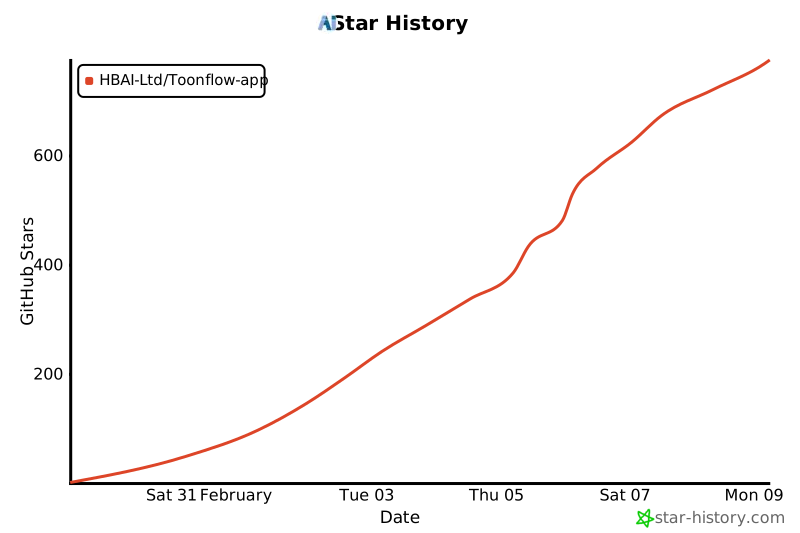](https://www.star-history.com/#HBAI-Ltd/Toonflow-app&type=date&legend=top-left) --- # 🙏 Special Thanks Thanks to the following open-source projects for empowering Toonflow: - [Express](https://expressjs.com/) – Fast, open, minimal Node.js web framework - [LangChain](https://js.langchain.com/) – Framework for building LLM apps - [Better-SQLite3](https://github.com/WiseLibs/better-sqlite3) – High-performance SQLite3 bindings - [Sharp](https://sharp.pixelplumbing.com/) – High-performance Node.js image processing - [Axios](https://axios-http.com/) – Promise-based HTTP client - [Zod](https://zod.dev/) – TypeScript-first schema validation - [Aigne](https://github.com/aigne-com/aigne) – Unified LLM API middleware - [Electron](https://www.electronjs.org/) – Cross-platform desktop app framework Thanks to the following organizations/individuals for supporting Toonflow:

|
Sophnet Cloud provided compute sponsorship [Official Site] |