 Rdzleo
e95d0c414e
Rdzleo
e95d0c414e
实现 ESP32-S3 上单摄像头人脸追踪的核心代码骨架,替代 Grove Vision AI V2
模块,通过 UART 发送人脸坐标驱动 RP2040 控制的眼球/YAW 舵机。

## 规划文档(docs/phase-01-face-tracking/)

- GOAL.md       Phase 目标与 5 大成功标准
- RESEARCH.md   esp-dl v3.2/3.3 + human_face_detect 0.4.1 技术调研
- PLAN.md       15 个原子任务的执行计划(T01-T15)
- PLAN_CHECK.md 计划审查报告(PASS_WITH_NOTES)
- PROGRESS.md   执行进度追踪(批次 1-3 已完成)

## 批次 1:依赖与开关(T01-T03)

- main/idf_component.yml
  新增 esp-dl ~3.3.0 + human_face_detect 0.4.1(仅 S3/P4)
  esp-sr 从 ~2.2.0 升级到 ~2.3.1,解决 esp-dsp 1.6/1.7 版本冲突
- main/Kconfig.projbuild
  新增 CONFIG_XIAOZHI_ENABLE_FACE_TRACKING 开关(默认 y,depends on S3)
  新增 CONFIG_XIAOZHI_FACE_TRACKING_FPS_CHOICE(5/10/15)
- main/boards/common/esp32_camera.{h,cc}
  新增 ProbeFrameCapture() 最小 V4L2 DQBUF/QBUF 探针(T01)
- main/application.cc
  Start() 末尾调用 probe 验证摄像头硬件链路

## 批次 2:人脸检测核心(T04-T06)

- main/boards/common/esp32_camera.{h,cc}
  新增 FrameRef 结构体 + CaptureForDetection/ReleaseDetectionFrame
  双超时 mutex 策略:face_tracker 10ms timeout 跳帧,Capture() RAII guard
- main/face_tracker.{h,cc}(新建)
  Core 0 / 优先级 2 / 栈 8KB 独立任务
  集成 esp-dl HumanFaceDetect 推理
  坐标归一化 cx*224/W-112,匹配 RP2040 pixel_centre=112
  多人脸遍历挑 score 最高,避免多脸时眼球摇摆
  三重保护:Kconfig depends on S3 + 源文件 #if 守卫 + CMake 条件排除
- main/CMakeLists.txt
  非 S3 目标从 SOURCES 移除 face_tracker.cc

## 批次 3:UART 协议扩展(T07)

- main/uart_component.{h,cc}
  新增 uart_send_face(x,y) 发送 face:x,y\r\n 协议
  extern "C" 链接名配合 face_tracker 的弱符号声明
  全局 TX mutex 保护所有 UART 写入,防并发帧交织
  uart_send_string 同步加锁保持一致性

## 编译验证

idf.py build 通过,固件 2.51MB / 剩余 1.46MB (36% free)
当前 face_tracker 未被 application 激活(留到 T11),
UART/摄像头现有功能零影响。

## 未完成(下次继续)

- T01 硬件 probe 实机验证
- T08-T10 RP2040 端 parse_face + facetrack 双数据源改造
- T11-T15 application 接入 + 端到端联调 + 性能调优 + 最终验收

Co-Authored-By: Claude Opus 4.7 (1M context) <noreply@anthropic.com>
An MCP-based Chatbot
Introduction
👉 Handcraft your AI girlfriend, beginner's guide【bilibili】
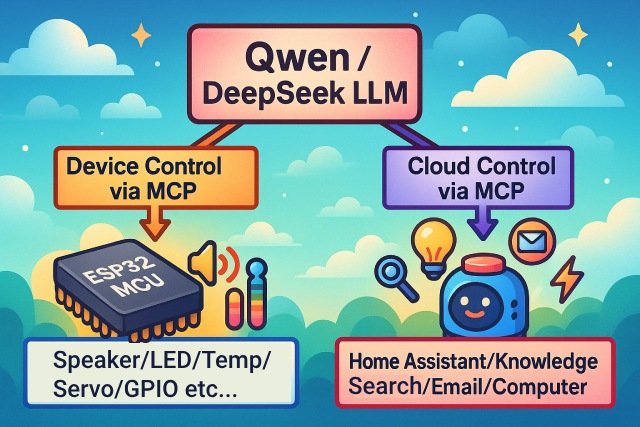
As a voice interaction entry, the XiaoZhi AI chatbot leverages the AI capabilities of large models like Qwen / DeepSeek, and achieves multi-terminal control via the MCP protocol.
Version Notes
The current v2 version is incompatible with the v1 partition table, so it is not possible to upgrade from v1 to v2 via OTA. For partition table details, see partitions/v2/README.md.
All hardware running v1 can be upgraded to v2 by manually flashing the firmware.
The stable version of v1 is 1.9.2. You can switch to v1 by running git checkout v1. The v1 branch will be maintained until February 2026.
Features Implemented
- Wi-Fi / ML307 Cat.1 4G
- Offline voice wake-up ESP-SR
- Supports two communication protocols (Websocket or MQTT+UDP)
- Uses OPUS audio codec
- Voice interaction based on streaming ASR + LLM + TTS architecture
- Speaker recognition, identifies the current speaker 3D Speaker
- OLED / LCD display, supports emoji display
- Battery display and power management
- Multi-language support (Chinese, English, Japanese)
- Supports ESP32-C3, ESP32-S3, ESP32-P4 chip platforms
- Device-side MCP for device control (Speaker, LED, Servo, GPIO, etc.)
- Cloud-side MCP to extend large model capabilities (smart home control, PC desktop operation, knowledge search, email, etc.)
- Customizable wake words, fonts, emojis, and chat backgrounds with online web-based editing (Custom Assets Generator)
Hardware
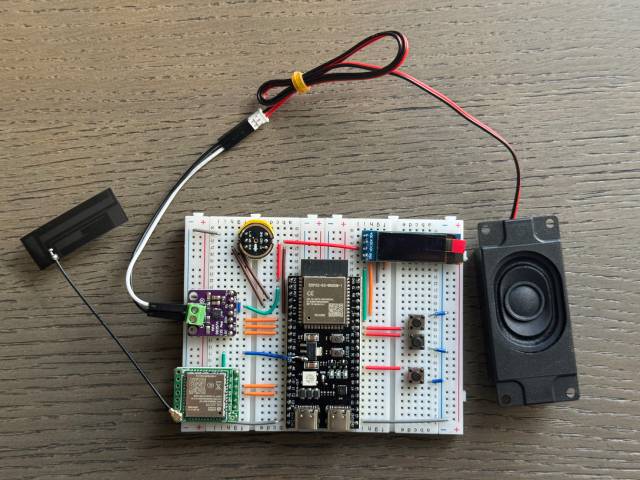
Breadboard DIY Practice
See the Feishu document tutorial:
👉 "XiaoZhi AI Chatbot Encyclopedia"
Breadboard demo:
Supports 70+ Open Source Hardware (Partial List)
- LiChuang ESP32-S3 Development Board
- Espressif ESP32-S3-BOX3
- M5Stack CoreS3
- M5Stack AtomS3R + Echo Base
- Magic Button 2.4
- Waveshare ESP32-S3-Touch-AMOLED-1.8
- LILYGO T-Circle-S3
- XiaGe Mini C3
- CuiCan AI Pendant
- WMnologo-Xingzhi-1.54TFT
- SenseCAP Watcher
- ESP-HI Low Cost Robot Dog


Software
Firmware Flashing
For beginners, it is recommended to use the firmware that can be flashed without setting up a development environment.
The firmware connects to the official xiaozhi.me server by default. Personal users can register an account to use the Qwen real-time model for free.
👉 Beginner's Firmware Flashing Guide
Development Environment
- Cursor or VSCode
- Install ESP-IDF plugin, select SDK version 5.4 or above
- Linux is better than Windows for faster compilation and fewer driver issues
- This project uses Google C++ code style, please ensure compliance when submitting code
Developer Documentation
- Custom Board Guide - Learn how to create custom boards for XiaoZhi AI
- MCP Protocol IoT Control Usage - Learn how to control IoT devices via MCP protocol
- MCP Protocol Interaction Flow - Device-side MCP protocol implementation
- MQTT + UDP Hybrid Communication Protocol Document
- A detailed WebSocket communication protocol document
Large Model Configuration
If you already have a XiaoZhi AI chatbot device and have connected to the official server, you can log in to the xiaozhi.me console for configuration.
👉 Backend Operation Video Tutorial (Old Interface)
Related Open Source Projects
For server deployment on personal computers, refer to the following open-source projects:
- xinnan-tech/xiaozhi-esp32-server Python server
- joey-zhou/xiaozhi-esp32-server-java Java server
- AnimeAIChat/xiaozhi-server-go Golang server
Other client projects using the XiaoZhi communication protocol:
- huangjunsen0406/py-xiaozhi Python client
- TOM88812/xiaozhi-android-client Android client
- 100askTeam/xiaozhi-linux Linux client by 100ask
- 78/xiaozhi-sf32 Bluetooth chip firmware by Sichuan
- QuecPython/solution-xiaozhiAI QuecPython firmware by Quectel
Custom Assets Tools:
- 78/xiaozhi-assets-generator Custom Assets Generator (Wake words, fonts, emojis, backgrounds)
About the Project
This is an open-source ESP32 project, released under the MIT license, allowing anyone to use it for free, including for commercial purposes.
We hope this project helps everyone understand AI hardware development and apply rapidly evolving large language models to real hardware devices.
If you have any ideas or suggestions, please feel free to raise Issues or join the QQ group: 1011329060