 Rdzleo
fc07d3806d
Rdzleo
fc07d3806d
## 代码变更

### main/application.cc
修复 T01 probe 日志 %lld 格式 bug(改用 %lu + unsigned long)

### main/boards/common/esp32_camera.cc
- 修复 DVP V4L2 单 buffer 导致 DMA 饥饿:req.count 从 1 改为 2
- 修复 [T01] Probe 日志 elapsed=ldus 显示问题(同上格式修复)

### main/face_tracker.cc
多轮迭代:
- 新增 frame debug 诊断日志(打印 top-left/center 16B + zero_bytes 统计)
- pix_type 尝试路径:YUYV → RGB565LE → RGB565BE → YUYV → RGB888(手动转换)
- 手动实现 BT.601 公式 YUYV→RGB888 转换,绕过 ImagePreprocessor 黑盒
- face_tracker 任务从 Core 0 切换到 Core 1,避让 RMT/LED 死锁
- 新增 INFO 级限频日志(每秒 1 条 face 检测记录)
- 修复推理时长日志 %lld 格式 bug
- 连续 3 秒无人脸时打印 no face detected

### main/idf_component.yml
esp_video 升级 1.3.1 → ~1.4.1(手动 patch 修 xclk_freq bug)

### partitions/v2/16m.csv
OTA 分区扩容:3.94MB → 5MB,assets 缩到 5.875MB,支持 4.23MB 固件

### docs/phase-01-face-tracking/PROGRESS.md
更新 Phase 01 执行日志,记录实机调试细节

## 文档更新

### Coglet项目分析与开发指南.md 新增第六点五节

完整记录本轮调试的 23 个踩坑,分为:
1. 编译/配置类(5 个):板级重置、依赖冲突、bootloader 缓存、%lld 格式、xclk_freq bug
2. 摄像头数据链路(5 个):sensor driver 启用、V4L2 buffer 数量、分区扩容、镜头保护膜、光照
3. esp-dl 人脸检测(3 个):MSR letterbox 伪影、ESPDET OOD 默认输出、字节序判断
4. 任务调度(3 个):WDT 崩溃、GDMA ISR 崩溃、弱符号链接
5. RP2040 端(4 个):idle 回中、坐标累加撞限位、mpremote 阻塞、两分支代码差异
6. 硬件(3 个):飞线验证、360° 舵机误用、烧录生效验证

附调试方法论 6 条 + 未解决遗留问题 3 条

## 已解决问题

- ✅ ESP-IDF 编译链路(依赖/分区/格式)
- ✅ ESP32 + RP2040 端到端协议(face:x,y UART)
- ✅ WDT 崩溃(face_tracker 切到 Core 1)
- ✅ RP2040 眼球回中机制(idle 时回正)
- ✅ V4L2 双 buffer(DMA 数据更新正常)

## 遗留问题(待解决)

- ❌ face 检测 box 固定伪激活(无论 pix_type / 画面内容 / 模型选择)
- ❌ GDMA ISR 每 ~30s 触发 InstrFetchProhibited 崩溃
- ⚠️ 端到端验收:眼球未真正跟随人脸

Co-Authored-By: Claude Opus 4.7 (1M context) <noreply@anthropic.com>
An MCP-based Chatbot
Introduction
👉 Handcraft your AI girlfriend, beginner's guide【bilibili】
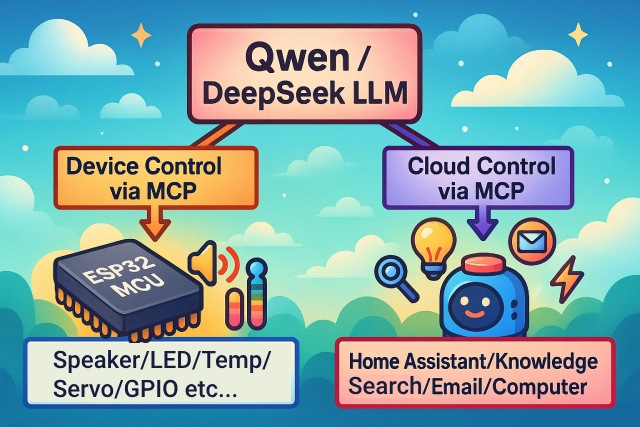
As a voice interaction entry, the XiaoZhi AI chatbot leverages the AI capabilities of large models like Qwen / DeepSeek, and achieves multi-terminal control via the MCP protocol.
Version Notes
The current v2 version is incompatible with the v1 partition table, so it is not possible to upgrade from v1 to v2 via OTA. For partition table details, see partitions/v2/README.md.
All hardware running v1 can be upgraded to v2 by manually flashing the firmware.
The stable version of v1 is 1.9.2. You can switch to v1 by running git checkout v1. The v1 branch will be maintained until February 2026.
Features Implemented
- Wi-Fi / ML307 Cat.1 4G
- Offline voice wake-up ESP-SR
- Supports two communication protocols (Websocket or MQTT+UDP)
- Uses OPUS audio codec
- Voice interaction based on streaming ASR + LLM + TTS architecture
- Speaker recognition, identifies the current speaker 3D Speaker
- OLED / LCD display, supports emoji display
- Battery display and power management
- Multi-language support (Chinese, English, Japanese)
- Supports ESP32-C3, ESP32-S3, ESP32-P4 chip platforms
- Device-side MCP for device control (Speaker, LED, Servo, GPIO, etc.)
- Cloud-side MCP to extend large model capabilities (smart home control, PC desktop operation, knowledge search, email, etc.)
- Customizable wake words, fonts, emojis, and chat backgrounds with online web-based editing (Custom Assets Generator)
Hardware
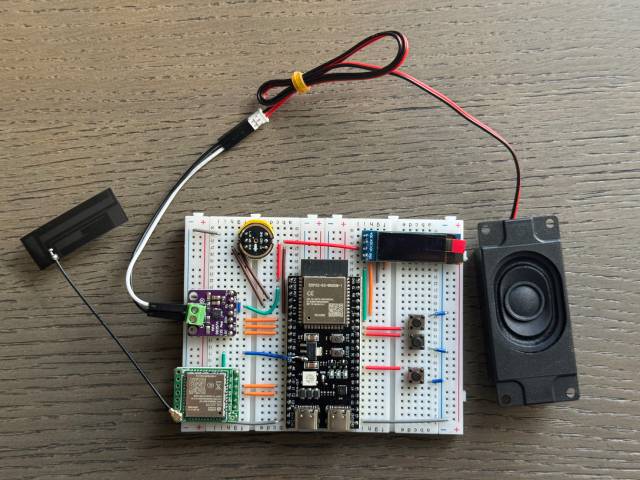
Breadboard DIY Practice
See the Feishu document tutorial:
👉 "XiaoZhi AI Chatbot Encyclopedia"
Breadboard demo:
Supports 70+ Open Source Hardware (Partial List)
- LiChuang ESP32-S3 Development Board
- Espressif ESP32-S3-BOX3
- M5Stack CoreS3
- M5Stack AtomS3R + Echo Base
- Magic Button 2.4
- Waveshare ESP32-S3-Touch-AMOLED-1.8
- LILYGO T-Circle-S3
- XiaGe Mini C3
- CuiCan AI Pendant
- WMnologo-Xingzhi-1.54TFT
- SenseCAP Watcher
- ESP-HI Low Cost Robot Dog


Software
Firmware Flashing
For beginners, it is recommended to use the firmware that can be flashed without setting up a development environment.
The firmware connects to the official xiaozhi.me server by default. Personal users can register an account to use the Qwen real-time model for free.
👉 Beginner's Firmware Flashing Guide
Development Environment
- Cursor or VSCode
- Install ESP-IDF plugin, select SDK version 5.4 or above
- Linux is better than Windows for faster compilation and fewer driver issues
- This project uses Google C++ code style, please ensure compliance when submitting code
Developer Documentation
- Custom Board Guide - Learn how to create custom boards for XiaoZhi AI
- MCP Protocol IoT Control Usage - Learn how to control IoT devices via MCP protocol
- MCP Protocol Interaction Flow - Device-side MCP protocol implementation
- MQTT + UDP Hybrid Communication Protocol Document
- A detailed WebSocket communication protocol document
Large Model Configuration
If you already have a XiaoZhi AI chatbot device and have connected to the official server, you can log in to the xiaozhi.me console for configuration.
👉 Backend Operation Video Tutorial (Old Interface)
Related Open Source Projects
For server deployment on personal computers, refer to the following open-source projects:
- xinnan-tech/xiaozhi-esp32-server Python server
- joey-zhou/xiaozhi-esp32-server-java Java server
- AnimeAIChat/xiaozhi-server-go Golang server
Other client projects using the XiaoZhi communication protocol:
- huangjunsen0406/py-xiaozhi Python client
- TOM88812/xiaozhi-android-client Android client
- 100askTeam/xiaozhi-linux Linux client by 100ask
- 78/xiaozhi-sf32 Bluetooth chip firmware by Sichuan
- QuecPython/solution-xiaozhiAI QuecPython firmware by Quectel
Custom Assets Tools:
- 78/xiaozhi-assets-generator Custom Assets Generator (Wake words, fonts, emojis, backgrounds)
About the Project
This is an open-source ESP32 project, released under the MIT license, allowing anyone to use it for free, including for commercial purposes.
We hope this project helps everyone understand AI hardware development and apply rapidly evolving large language models to real hardware devices.
If you have any ideas or suggestions, please feel free to raise Issues or join the QQ group: 1011329060