 Rdzleo
bc14e60836
Rdzleo
bc14e60836
一、新增功能
1. 聆听状态空闲超时自动退出
   - 聆听状态下无用户交互(无语音对话、无按键操作、无音频播放)超过60秒后,
     设备自动关闭音频通道回到idle待命状态,行为等同于手动按下BOOT按键退出
   - 超时时间通过Kconfig CONFIG_LISTENING_IDLE_TIMEOUT_SECONDS可配置(范围30~300秒,默认60秒)
   - speaking状态期间暂停计时,回到listening后从0重新倒计时,确保用户有完整的思考时间

2. 聆听空闲计时器外部重置接口
   - 新增ResetListeningIdleTimer()公开方法,供板级按键/触摸回调调用
   - 重置触发点:触摸按键(摸脑袋等)、BOOT按键、故事按键、收到服务端stt/tts/music_control/story消息

二、Bug修复
3. 修复超时退出后待命音效无声
   - 原因:超时退出路径中audio_processor_.Stop()关闭了功放,之后才播放待命音效
   - 修复:在SetDeviceState(kDeviceStateIdle)播放待命音效前调用codec->EnableOutput(true)确保功放开启

4. 修复WebSocket断开与tts:stop竞态导致崩溃重启
   - 原因:tts:stop和WebSocket断开同时发生时,设备切换到listening触发SendStartListening失败,
     竞态导致WakeWordDetect堆损坏(StoreProhibited崩溃)
   - 修复:tts:stop处理中先检查IsAudioChannelOpened(),音频通道不可用时直接回退到idle

5. 修复listening状态音频通道不可用时逻辑错误
   - 原因:音频通道不可用时"保持在listening状态"导致后续状态混乱
   - 修复:改为直接回退到idle状态

三、优化调整
6. 版本号从1.7.5升级到1.7.6
7. ADC电量采样间隔从10ms缩短为5ms,提高采样效率
8. 日志配置调整:恢复日志输出能力用于调试
9. WiFi组件代码注释补充
10. 新增.gitignore,忽略build目录和.vscode/settings.json

Co-Authored-By: Claude Opus 4.6 (1M context) <noreply@anthropic.com>
ESP32 WiFi Connect
This component helps with WiFi connection for the device.
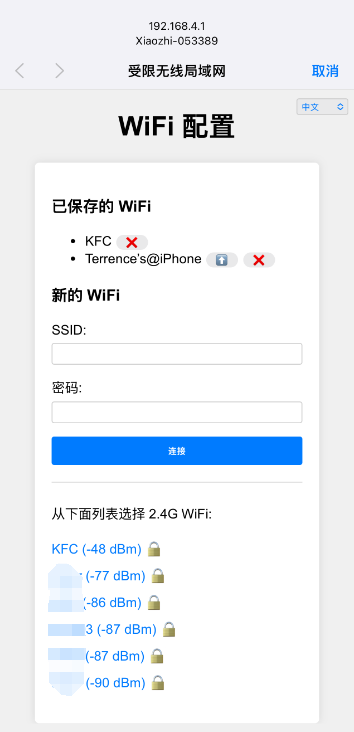
It first tries to connect to a WiFi network using the credentials stored in the flash. If this fails, it starts an access point and a web server to allow the user to connect to a WiFi network.
The URL to access the web server is http://192.168.4.1.
Here is a screenshot of the web server:
Changelog: v2.3.0
- Add support for language request.
Changelog: v2.2.0
- Add support for ESP32 SmartConfig(ESPTouch v2)
Changelog: v2.1.0
- Improve WiFi connection logic.
Changelog: v2.0.0
- Add support for multiple WiFi SSID management.
- Auto switch to the best WiFi network.
- Captive portal for WiFi configuration.
- Support for multiple languages (English, Chinese).
Configuration
The WiFi credentials are stored in the flash under the "wifi" namespace.
The keys are "ssid", "ssid1", "ssid2" ... "ssid9", "password", "password1", "password2" ... "password9".
Usage
// Initialize the default event loop
ESP_ERROR_CHECK(esp_event_loop_create_default());

// Initialize NVS flash for WiFi configuration
esp_err_t ret = nvs_flash_init();
if (ret == ESP_ERR_NVS_NO_FREE_PAGES || ret == ESP_ERR_NVS_NEW_VERSION_FOUND) {
    ESP_ERROR_CHECK(nvs_flash_erase());
    ret = nvs_flash_init();
}
ESP_ERROR_CHECK(ret);

// Get the WiFi configuration
auto& ssid_list = SsidManager::GetInstance().GetSsidList();
if (ssid_list.empty()) {
    // Start the WiFi configuration AP
    auto& ap = WifiConfigurationAp::GetInstance();
    ap.SetSsidPrefix("ESP32");
    ap.Start();
    return;
}

// Otherwise, connect to the WiFi network
WifiStation::GetInstance().Start();