 zyc
88ea709bbb
zyc
88ea709bbb
All checks were successful
Build and Deploy / build-and-deploy (push) Successful in 3m32s
471 lines
16 KiB
Markdown
471 lines
16 KiB
Markdown
<p align="center">
|
|
<a href="../README.md">中文</a> |
|
|
<strong>English</strong>
|
|
</p>
|
|
|
|
<div align="center">
|
|
|
|
<img src="./logo.png" alt="Toonflow Logo" height="120"/>
|
|
|
|
# Toonflow Web
|
|
|
|
<p align="center">
|
|
<b>
|
|
Toonflow Frontend Application
|
|
<br />
|
|
Modern Web interface built with Vue 3 + TypeScript + Vite
|
|
<br />
|
|
User frontend for AI Short Drama Factory 🎨
|
|
</b>
|
|
</p>
|
|
<p align="center">
|
|
<a href="https://github.com/HBAI-Ltd/Toonflow-web/stargazers">
|
|
<img src="https://img.shields.io/github/stars/HBAI-Ltd/Toonflow-web?style=for-the-badge&logo=github" alt="Stars Badge" />
|
|
</a>
|
|
<a href="https://www.gnu.org/licenses/agpl-3.0" target="_blank">
|
|
<img src="https://img.shields.io/badge/License-AGPL-blue.svg?style=for-the-badge" alt="AGPL License Badge" />
|
|
</a>
|
|
<a href="https://github.com/HBAI-Ltd/Toonflow-web/releases">
|
|
<img alt="release" src="https://img.shields.io/github/v/release/HBAI-Ltd/Toonflow-web?style=for-the-badge" />
|
|
</a>
|
|
</p>
|
|
|
|
> 🎯 **Modern Frontend Architecture**: Built with Vue 3 Composition API, TypeScript type safety, and Vite for lightning-fast builds, delivering a smooth user experience!
|
|
</div>
|
|
|
|
---
|
|
|
|
# ⚠️ Important Notice
|
|
|
|
> **This repository only contains the frontend source code, suitable for developers for secondary development or customization.**
|
|
>
|
|
> 🎉 **If you are a regular user wishing to use Toonflow directly, please go to the main repository to download the full client:**
|
|
>
|
|
> | Platform | Link |
|
|
> | ------------------------------------------------------------------------------------------------------------ | ------------------------------------------------------------------------------- |
|
|
> | <img src="https://img.shields.io/badge/GitHub-181717?style=flat&logo=github&logoColor=white" alt="GitHub" /> | 👉 [github.com/HBAI-Ltd/Toonflow-app](https://github.com/HBAI-Ltd/Toonflow-app) |
|
|
> | <img src="https://img.shields.io/badge/Gitee-C71D23?style=flat&logo=gitee&logoColor=white" alt="Gitee" /> | 👉 [gitee.com/HBAI-Ltd/Toonflow-app](https://gitee.com/HBAI-Ltd/Toonflow-app) |
|
|
>
|
|
> The main repository includes:
|
|
>
|
|
> - ✅ Complete desktop client
|
|
> - ✅ Backend service
|
|
> - ✅ Ready-to-use installer
|
|
> - ✅ Detailed usage tutorial
|
|
|
|
---
|
|
|
|
# 🌟 Tech Stack
|
|
|
|
- **Framework**: Vue 3.5+ (Composition API)
|
|
- **Build Tool**: Vite 5.4+
|
|
- **Language**: TypeScript 5.6+
|
|
- **State Management**: Pinia 2.2+ (supports persistence)
|
|
- **Routing**: Vue Router 4.4+
|
|
- **UI Component Libraries**:
|
|
- Ant Design Vue 4.2+
|
|
- Element Plus 2.13+
|
|
- VXE Table 4.17+
|
|
- **Utility Libraries**:
|
|
- Axios - HTTP requests
|
|
- VueUse - Vue composition utilities
|
|
- Day.js - Date handling
|
|
- Mammoth - Word document parsing
|
|
|
|
---
|
|
|
|
# 🎨 Main Feature Modules
|
|
|
|
Toonflow Web provides a complete frontend for short drama creation, including these core modules:
|
|
|
|
- ✅ **Project Management**
|
|
Create, edit, and manage drama projects with project status tracking and multi-project parallel development.
|
|
|
|
- ✅ **Raw Text Editing**
|
|
Import and edit novel manuscripts, supports Word document parsing, intelligent text cleansing, and chapter splitting.
|
|
|
|
- ✅ **Character Asset Library**
|
|
Manage character settings and images; supports batch generation, manual upload, and online editing.
|
|
|
|
- ✅ **Outline Management**
|
|
Visual editing of story outlines and event lines, with drag-and-drop sorting and smart generation.
|
|
|
|
- ✅ **Script Editor**
|
|
Structured script editing interface, supports labeling dialogues, scenes, emotions, and more dimensions.
|
|
|
|
- ✅ **Storyboard Design**
|
|
Visual storyboard canvas with drag-and-drop layout, image detection, and AI conversational storyboard generation.
|
|
|
|
- ✅ **Video Configuration**
|
|
Configure video generation parameters, support switching among multiple AI video providers, and video downloading.
|
|
|
|
- ✅ **Task Monitoring**
|
|
Real-time monitoring of AI generation tasks, supports task queue management and history search.
|
|
|
|
- ✅ **System Settings**
|
|
Configure AI providers, prompt templates, user permissions, and other system-level parameters.
|
|
|
|
---
|
|
|
|
# 📦 Application Scenarios
|
|
|
|
- Frontend operation interface for short drama content creation
|
|
- Visual platform for AI-assisted screenwriting tools
|
|
- Workbench for storyboard design and video generation
|
|
- Scenario management system for multi-user collaboration
|
|
|
|
---
|
|
|
|
# 🚀 Getting Started Quickly
|
|
|
|
## 💡 What kind of user are you?
|
|
|
|
| User Type | Recommended Solution | GitHub | Gitee |
|
|
| ------------------------------------------- | -------------------- | -------------------------------------------------------- | ------------------------------------------------------- |
|
|
| 🎬 **Regular User** - Want to use Toonflow | Download full client | [Toonflow-app](https://github.com/HBAI-Ltd/Toonflow-app) | [Toonflow-app](https://gitee.com/HBAI-Ltd/Toonflow-app) |
|
|
| 👨💻 **Developer** - Want to modify or extend | Continue reading | This repository | This repository |
|
|
|
|
---
|
|
|
|
## Prerequisites
|
|
|
|
Before developing and running this project, please ensure you have installed:
|
|
|
|
- ✅ **Node.js**: version 23.11.1 or above
|
|
- ✅ **Yarn**: version 1.22.0 or above (recommended package manager)
|
|
- ✅ **Backend service**: Make sure the Toonflow backend service is running and accessible (available from [GitHub](https://github.com/HBAI-Ltd/Toonflow-app) or [Gitee](https://gitee.com/HBAI-Ltd/Toonflow-app))
|
|
|
|
## Local Development
|
|
|
|
### 1. Clone the Project
|
|
|
|
**GitHub:**
|
|
|
|
```bash
|
|
git clone https://github.com/HBAI-Ltd/Toonflow-web.git
|
|
cd Toonflow-web
|
|
```
|
|
|
|
**Gitee (recommended for China):**
|
|
|
|
```bash
|
|
git clone https://gitee.com/HBAI-Ltd/Toonflow-web.git
|
|
cd Toonflow-web
|
|
```
|
|
|
|
### 2. Install Dependencies
|
|
|
|
```bash
|
|
yarn install
|
|
```
|
|
|
|
### 3. Start the Development Server
|
|
|
|
```bash
|
|
yarn dev
|
|
```
|
|
|
|
The dev server runs at `http://localhost:5173` by default, with hot module replacement (HMR) enabled.
|
|
|
|
### 4. Build for Production
|
|
|
|
```bash
|
|
# Development build
|
|
yarn build:dev
|
|
|
|
# Production build
|
|
yarn build:prod
|
|
```
|
|
|
|
The build output will be in the `dist` directory.
|
|
|
|
### 5. Preview Production Build
|
|
|
|
```bash
|
|
yarn preview
|
|
```
|
|
|
|
---
|
|
|
|
## Production Deployment
|
|
|
|
### Method 1: Static File Deployment
|
|
|
|
1. **Build the Project**
|
|
|
|
```bash
|
|
yarn build:prod
|
|
```
|
|
|
|
2. **Deploy to Web Server**
|
|
|
|
Upload all files in the `dist` directory to the root directory of Nginx, Apache, or any other web server.
|
|
|
|
**Sample Nginx configuration:**
|
|
|
|
```nginx
|
|
server {
|
|
listen 80;
|
|
server_name your-domain.com;
|
|
root /var/www/toonflow-web/dist;
|
|
index index.html;
|
|
|
|
location / {
|
|
try_files $uri $uri/ /index.html;
|
|
}
|
|
|
|
# API Proxy (optional)
|
|
location /api/ {
|
|
proxy_pass http://localhost:10588/;
|
|
proxy_set_header Host $host;
|
|
proxy_set_header X-Real-IP $remote_addr;
|
|
}
|
|
}
|
|
```
|
|
|
|
### Method 2: Integrated deployment with backend
|
|
|
|
Copy the contents of the built `dist` directory into the backend's static resources directory `scripts/web`.
|
|
|
|
> 💡 **Note**: The backend service can be obtained from [GitHub](https://github.com/HBAI-Ltd/Toonflow-app) or [Gitee](https://gitee.com/HBAI-Ltd/Toonflow-app).
|
|
|
|
---
|
|
|
|
# 🔧 Development Guide
|
|
|
|
## Prepare Development Environment
|
|
|
|
- **Node.js**: version 23.11.1 or above required
|
|
- **Yarn**: recommended package manager
|
|
|
|
## Common Commands
|
|
|
|
```bash
|
|
# Install dependencies
|
|
yarn install
|
|
|
|
# Start development server (supports hot reload)
|
|
yarn dev
|
|
|
|
# Type checking
|
|
yarn type-check
|
|
|
|
# Code linting and auto-fix
|
|
yarn lint
|
|
|
|
# Code formatting
|
|
yarn format
|
|
|
|
# Development build
|
|
yarn build:dev
|
|
|
|
# Production build
|
|
yarn build:prod
|
|
|
|
# Preview production build
|
|
yarn preview
|
|
|
|
# Generate third-party license list
|
|
yarn license
|
|
```
|
|
|
|
## Project Structure
|
|
|
|
```
|
|
📂 Toonflow-web/
|
|
├─ 📂 public/ # Static assets
|
|
├─ 📂 scripts/ # Build scripts
|
|
│ └─ 📄 license.ts # License generator script
|
|
├─ 📂 src/
|
|
│ ├─ 📂 assets/ # Static assets (styles, images, etc.)
|
|
│ │ └─ 📄 main.css # Global styles
|
|
│ ├─ 📂 components/ # Common components
|
|
│ │ ├─ 📄 sider.vue # Sidebar component
|
|
│ │ ├─ 📂 chat/ # Chat components
|
|
│ │ ├─ 📂 storyboardEditor/ # Storyboard editor
|
|
│ │ └─ 📂 videoConfig/ # Video config components
|
|
│ ├─ 📂 config/ # Configuration files
|
|
│ │ └─ 📄 manufacturerConfig.ts # Manufacturer configuration
|
|
│ ├─ 📂 pages/ # Page components
|
|
│ │ ├─ 📂 error/ # Error pages
|
|
│ │ ├─ 📂 login/ # Login page
|
|
│ │ └─ 📂 workbench/ # Workbench
|
|
│ ├─ 📂 router/ # Routing configuration
|
|
│ │ └─ 📄 index.ts # Route definitions
|
|
│ ├─ 📂 stores/ # Pinia state management
|
|
│ │ ├─ 📄 index.ts # Store entry
|
|
│ │ ├─ 📄 loadingStore.ts # Loading state
|
|
│ │ ├─ 📄 user.ts # User state
|
|
│ │ └─ 📄 video.ts # Video state
|
|
│ ├─ 📂 types/ # TypeScript type definitions
|
|
│ │ ├─ 📄 auto-imports.d.ts # Auto-imported types
|
|
│ │ ├─ 📄 components.d.ts # Component types
|
|
│ │ ├─ 📄 global.d.ts # Global types
|
|
│ │ ├─ 📄 manufacturer.ts # Manufacturer types
|
|
│ │ └─ 📄 shims-vue.d.ts # Vue module declarations
|
|
│ ├─ 📂 utils/ # Utility functions
|
|
│ │ ├─ 📄 axios.ts # HTTP request wrapper
|
|
│ │ ├─ 📄 combineImages.ts # Image composition
|
|
│ │ ├─ 📄 error.ts # Error handling
|
|
│ │ ├─ 📄 parseNovel.ts # Novel parsing
|
|
│ │ ├─ 📄 splitGraph.ts # Image segmentation
|
|
│ │ ├─ 📄 throttle.ts # Throttling/debouncing
|
|
│ │ └─ 📄 wsClient.ts # WebSocket client
|
|
│ ├─ 📂 views/ # View pages
|
|
│ │ ├─ 📂 project/ # Project management
|
|
│ │ ├─ 📂 projectDetail/ # Project details
|
|
│ │ │ ├─ 📂 components/
|
|
│ │ │ │ ├─ 📂 assetsManager/ # Asset management
|
|
│ │ │ │ ├─ 📂 originalText/ # Raw text
|
|
│ │ │ │ ├─ 📂 outlineManager/ # Outline management
|
|
│ │ │ │ ├─ 📂 overview/ # Project overview
|
|
│ │ │ │ └─ 📂 scriptManager/ # Script management
|
|
│ │ ├─ 📂 setting/ # System settings
|
|
│ │ └─ 📂 taskList/ # Task list
|
|
│ ├─ 📄 App.vue # Root component
|
|
│ └─ 📄 main.ts # App entry point
|
|
├─ 📄 components.d.ts # Global component types
|
|
├─ 📄 eslint.config.js # ESLint config
|
|
├─ 📄 index.html # HTML template
|
|
├─ 📄 package.json # Project config
|
|
├─ 📄 tsconfig.json # TypeScript config
|
|
├─ 📄 tsconfig.app.json # App TS config
|
|
├─ 📄 tsconfig.node.json # Node TS config
|
|
├─ 📄 vite.config.ts # Vite config
|
|
├─ 📄 LICENSE # License
|
|
├─ 📄 NOTICES.txt # Third-party notices
|
|
└─ 📄 README.md # Project documentation
|
|
```
|
|
|
|
---
|
|
|
|
# 📝 Development Plan
|
|
|
|
We are continuously optimizing the frontend experience. Key development focuses in the near future:
|
|
|
|
1. **UI/UX Optimization**
|
|
- `🎨 Dark theme support` Elegant dark mode option to protect eyesight
|
|
- `📱 Responsive layout` Improved display for mobile and tablet devices
|
|
- `⌨️ Shortcut system` Adding shortcuts for common operations to improve efficiency
|
|
|
|
2. **Feature Enhancements**
|
|
- `📊 Data visualization` Advanced project statistics and chart displays
|
|
- `🔄 Real-time collaboration` Multi-user simultaneous editing and real-time sync
|
|
- `💾 Auto-save` Smart auto-save to prevent data loss
|
|
|
|
3. **Performance Optimization**
|
|
- `⚡ Virtual scrolling` High-performance optimization for large lists
|
|
- `🗜️ Asset compression` Optimizing build size for faster loading
|
|
- `🔌 Lazy loading optimization` Further optimize route and component lazy loading strategy
|
|
|
|
---
|
|
|
|
# 🐛 FAQ
|
|
|
|
### Q: Port is occupied when starting dev server?
|
|
|
|
**A:** Modify the port configuration in `vite.config.ts`:
|
|
|
|
```typescript
|
|
export default defineConfig({
|
|
server: {
|
|
port: 3000, // change to another port
|
|
},
|
|
});
|
|
```
|
|
|
|
### Q: How to configure the backend API address?
|
|
|
|
**A:** Set the backend address in `.env.dev`:
|
|
|
|
```bash
|
|
VITE_TYPE=dev
|
|
VITE_BASE_URL=http://127.0.0.1:10588
|
|
VITE_WS_URL=ws://127.0.0.1:10588
|
|
```
|
|
|
|
### Q: I just want to use Toonflow, not develop, what should I do?
|
|
|
|
**A:** Please go to the main repository to download the complete client:
|
|
|
|
- **GitHub**: 👉 [Toonflow-app](https://github.com/HBAI-Ltd/Toonflow-app)
|
|
- **Gitee**: 👉 [Toonflow-app](https://gitee.com/HBAI-Ltd/Toonflow-app)
|
|
|
|
---
|
|
|
|
# 🔗 Related Repositories
|
|
|
|
| Repository | Description | GitHub | Gitee |
|
|
| ---------------- | ---------------------------------- | -------------------------------------------------- | ------------------------------------------------ |
|
|
| **Toonflow-app** | Complete client (recommended user) | [GitHub](https://github.com/HBAI-Ltd/Toonflow-app) | [Gitee](https://gitee.com/HBAI-Ltd/Toonflow-app) |
|
|
| **Toonflow-web** | Frontend source code (this repo) | [GitHub](https://github.com/HBAI-Ltd/Toonflow-web) | [Gitee](https://gitee.com/HBAI-Ltd/Toonflow-web) |
|
|
|
|
---
|
|
|
|
# 👨👩👧👦 WeChat Community Group
|
|
|
|
~~Group 1~~
|
|
|
|
~~Group 2~~
|
|
|
|
~~Group 3~~
|
|
|
|
~~Group 4~~
|
|
|
|
~~Group 5~~
|
|
|
|
Group 6:
|
|
|
|
<img src="./chat6QR.jpg" alt="Toonflow Logo" height="400"/>
|
|
<p>Scan with WeChat to add. If the QR code expires, submit an Issue for update.</p>
|
|
|
|
---
|
|
|
|
# 💌 Contact Us
|
|
|
|
📧 Email: [ltlctools@outlook.com](mailto:ltlctools@outlook.com?subject=Toonflow%20Frontend%20Consultation)
|
|
|
|
---
|
|
|
|
# 📜 License
|
|
|
|
Toonflow Web is open-sourced under the AGPL-3.0 license. See details: https://www.gnu.org/licenses/agpl-3.0.html
|
|
|
|
You may use Toonflow Web for any purposes, including commercial, as long as you comply with the AGPL-3.0 terms and conditions.
|
|
|
|
If you wish to obtain a proprietary commercial license free from AGPL-3.0 restrictions, please contact us via email.
|
|
|
|
---
|
|
|
|
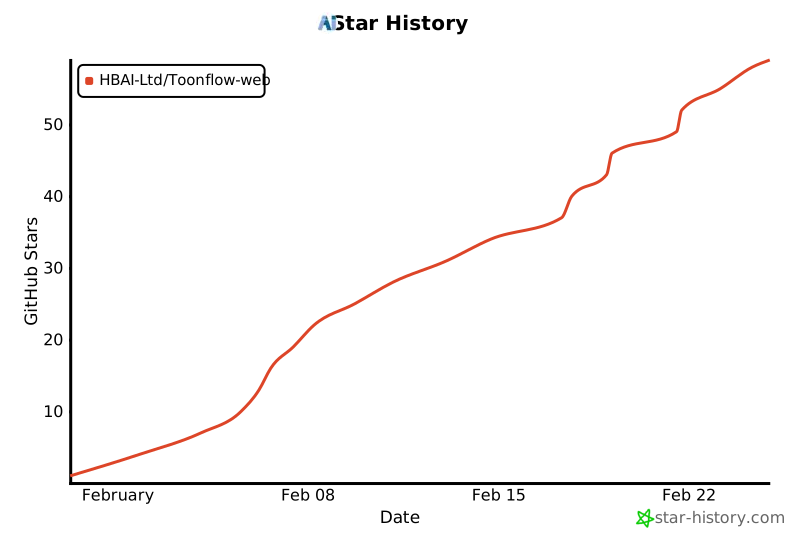
# ⭐️ Star History
|
|
|
|
[](https://www.star-history.com/#HBAI-Ltd/Toonflow-web&type=date&legend=top-left)
|
|
|
|
---
|
|
|
|
# 🙏 Acknowledgements
|
|
|
|
Thanks to the following open source projects for their strong support for Toonflow Web:
|
|
|
|
- [Vue.js](https://vuejs.org/) - Progressive JavaScript framework
|
|
- [Vite](https://vitejs.dev/) - Next generation frontend build tool
|
|
- [Ant Design Vue](https://antdv.com/) - Enterprise-level UI component library
|
|
- [Element Plus](https://element-plus.org/) - Vue 3-based component library
|
|
- [Pinia](https://pinia.vuejs.org/) - Intuitive state management library for Vue
|
|
|
|
Thanks to the following organizations/units/individuals for supporting Toonflow:
|
|
|
|
<table>
|
|
<tr>
|
|
<td>
|
|
<img src="./sponsored/sophnet.png" alt="Suan Neng Yun Logo" width="48">
|
|
</td>
|
|
<td>
|
|
<b>Suan Neng Yun</b> provides compute sponsorship
|
|
<a href="https://www.sophnet.com/">[Official Site]</a>
|
|
</td>
|
|
</tr>
|
|
</table>
|
|
|
|
For a complete list of third-party dependencies, please refer to `NOTICES.txt`
|