
733 lines
26 KiB
Markdown
733 lines
26 KiB
Markdown
<img src="https://capsule-render.vercel.app/api?type=waving&color=gradient&customColorList=6,11,20&height=200§ion=header&text=Toonflow&fontSize=90&fontColor=ffffff&animation=fadeIn&fontAlignY=50" width="100%"/>
|
||
|
||
<p>
|
||
<a href="https://github.com/HBAI-Ltd/Toonflow-app">
|
||
<img src="https://img.shields.io/badge/GitHub-181717?style=flat-square&logo=github&logoColor=white" alt="GitHub" />
|
||
</a>
|
||
|
|
||
<a href="https://gitee.com/HBAI-Ltd/Toonflow-app">
|
||
<img src="https://img.shields.io/badge/Gitee-C71D23?style=flat-square&logo=gitee&logoColor=white" alt="Gitee" />
|
||
</a>
|
||
|
|
||
<a href="https://gitcode.com/HBAI-Ltd/Toonflow-app">
|
||
<img src="./docs/atomgitLogo.svg" alt="Atomgit" style="height:20px"/>
|
||
</a>
|
||
</p>
|
||
|
||
<p align="center">
|
||
<a href="../README.md">简体中文</a> |
|
||
<strong>繁體中文</strong> |
|
||
<a href="./README.en.md">English</a> |
|
||
<a href="./README.th.md">ไทย</a> |
|
||
<a href="./README.vi.md">Tiếng Việt</a> |
|
||
<a href="./README.ja.md">日本語</a> |
|
||
<a href="./README.ru.md">Русский</a>
|
||
</p>
|
||
|
||
<div align="center">
|
||
|
||
<img src="./docs/logo.png" alt="Toonflow Logo" height="120"/>
|
||
|
||
[](https://git.io/typing-svg)
|
||
|
||
<p align="center">
|
||
<a href="https://github.com/HBAI-Ltd/Toonflow-app/stargazers">
|
||
<img src="https://img.shields.io/github/stars/HBAI-Ltd/Toonflow-app?style=for-the-badge&logo=github" alt="Stars Badge" />
|
||
</a>
|
||
<a href="https://www.apache.org/licenses/LICENSE-2.0" target="_blank">
|
||
<img src="https://img.shields.io/badge/License-Apache%202.0-blue.svg?style=for-the-badge" alt="Apache-2.0 License Badge" />
|
||
</a>
|
||
<a href="https://github.com/HBAI-Ltd/Toonflow-app/releases">
|
||
<img alt="release" src="https://img.shields.io/github/v/release/HBAI-Ltd/Toonflow-app?style=for-the-badge" />
|
||
</a>
|
||
</p>
|
||
<p align="center">
|
||
<a href="https://github.com/HBAI-Ltd/Toonflow-app/network/members">
|
||
<img src="https://img.shields.io/github/forks/HBAI-Ltd/Toonflow-app?style=for-the-badge&logo=github&color=orange" alt="Forks Badge" />
|
||
</a>
|
||
<a href="https://atomgit.com/HBAI-Ltd/Toonflow-app">
|
||
<img src="https://img.shields.io/badge/AtomGit-G--Star%20No.540-FF6B35?style=for-the-badge&logo=git&logoColor=white" alt="AtomGit G-Star No.540" />
|
||
</a>
|
||
<a href="https://discord.gg/HEjKmpNpAZ">
|
||
<img src="https://img.shields.io/badge/Discord-Community-5865F2?style=for-the-badge&logo=discord&logoColor=white" alt="Discord" />
|
||
</a>
|
||
</p>
|
||
<p align="center">
|
||
<a href="https://github.com/HBAI-Ltd/Toonflow-app/issues">
|
||
<img src="https://img.shields.io/github/issues/HBAI-Ltd/Toonflow-app?style=for-the-badge&color=F48D73" alt="Issues" />
|
||
</a>
|
||
<a href="https://github.com/HBAI-Ltd/Toonflow-app/graphs/contributors">
|
||
<img src="https://img.shields.io/github/contributors/HBAI-Ltd/Toonflow-app?style=for-the-badge&color=2088FF" alt="Contributors" />
|
||
</a>
|
||
<a href="https://github.com/HBAI-Ltd/Toonflow-app/commits">
|
||
<img src="https://img.shields.io/github/last-commit/HBAI-Ltd/Toonflow-app?style=for-the-badge&color=blueviolet" alt="Last Commit" />
|
||
</a>
|
||
</p>
|
||
<p align="center">
|
||
<img src="https://ziadoua.github.io/m3-Markdown-Badges/badges/TypeScript/typescript2.svg" alt="TypeScript" />
|
||
<img src="https://ziadoua.github.io/m3-Markdown-Badges/badges/NodeJS/nodejs2.svg" alt="Node.js" />
|
||
<img src="https://ziadoua.github.io/m3-Markdown-Badges/badges/Docker/docker2.svg" alt="Docker" />
|
||
<img src="https://ziadoua.github.io/m3-Markdown-Badges/badges/Electron/electron2.svg" alt="Electron" />
|
||
</p>
|
||
<p align="center">
|
||
<img src="https://mobaicons.com/icons/typescript,nodejs,electron,docker,socket?perline=5" alt="Tech Stack Icons" />
|
||
</p>
|
||
<p align="center">
|
||
<img src="https://widgetbite.com/stats/HBAI-Ltd" alt="Visitors" />
|
||
</p>
|
||
|
||
> 🚀 **一站式短劇工程**:從文本到角色,從分鏡到影片,0門檻全流程AI化,創作效率提升10倍+!
|
||
</div>
|
||
|
||
<div align="center">
|
||
<a href="./docs/g-star.png" target="_blank">
|
||
<img src="./docs/g-star.png" alt="AtomGit G-Star 認證證書" width="100%"/>
|
||
</a>
|
||
</div>
|
||
|
||
---
|
||
|
||
# 🌐 多語言支援
|
||
|
||
Toonflow 支援以下語言介面:
|
||
|
||
| 語言 | Language |
|
||
| ---------- | --------------------- |
|
||
| 簡體中文 | Chinese (Simplified) |
|
||
| 繁體中文 | Chinese (Traditional) |
|
||
| English | English |
|
||
| ไทย | Thai |
|
||
| Tiếng Việt | Vietnamese |
|
||
| 日本語 | Japanese |
|
||
| Русский | Russian |
|
||
|
||
> 💡 更多語言適配中,歡迎貢獻翻譯!
|
||
|
||
---
|
||
|
||
# 🌟 主要功能
|
||
|
||
Toonflow 是面向短劇生產的 AI 工作檯,圍繞「策劃 → 編劇 → 分鏡 → 出片」構建完整閉環,並支援本地化、可程式化、可持續迭代的生產流程。
|
||
|
||
- ✅ **無限畫布生產工作檯**
|
||
以類無限畫布形式組織劇本、角色、分鏡、素材與影片節點,支援自由編排、回溯與並行生產,不受線性步驟限制。
|
||
- ✅ **三層 Agent 協作體系**
|
||
決策層、執行層、監督層協同工作,涵蓋任務拆解、內容生成、品質審閱與修訂反饋,提升穩定性與成片一致性。
|
||
- ✅ **持久化 Agent 記憶**
|
||
基於本地 ONNX 向量檢索的跨會話記憶系統,支援短期訊息、長期摘要和語義召回,確保多輪創作連續性。
|
||
- ✅ **可程式化供應商系統**
|
||
支援在設定中心直接編寫供應商 TypeScript 邏輯並即時生效,無需改源碼或重啟,便於私有化和多模型接入。
|
||
- ✅ **章節事件圖譜驅動改編**
|
||
自動提取原著章節事件並結構化儲存,劇本改編按事件圖譜精準呼叫上下文,減少長文本資訊遺失。
|
||
- ✅ **Skill 檔案化配置**
|
||
ScriptAgent 與 ProductionAgent 的核心提示詞外化為 Markdown Skill 檔案,支援線上編輯與快速調優。
|
||
|
||
---
|
||
|
||
# 📦 應用場景
|
||
|
||
- 短視頻內容創作
|
||
- 小說影視化實驗
|
||
- AI 文學改編工具
|
||
- 劇本開發與快速原型
|
||
- 影片素材生成
|
||
|
||
---
|
||
|
||
# 🔰 使用指南
|
||
|
||
## 快速上手
|
||
|
||
1. 啟動應用並登入(預設帳號:`admin` / `admin123`)。
|
||
2. 在設定中心完成模型供應商配置(文字/圖像/影片模型)。
|
||
3. 新建專案並匯入原著,執行章節事件提取。
|
||
4. 進入 ScriptAgent 生成故事骨架、改編策略與結構化劇本。
|
||
5. 切換到 ProductionAgent,在無限畫布中組織分鏡、素材與影片節點。
|
||
6. 對分鏡圖進行節點化精調後回流工作檯,完成影片拼接與匯出。
|
||
|
||
## 📺 影片教學
|
||
|
||
https://www.bilibili.com/video/BV1oXD7BqEqJ
|
||
[](https://www.bilibili.com/video/BV1oXD7BqEqJ)
|
||
|
||
**Toonflow 12 分鐘快速上手 AI 影片**
|
||
👉 [點擊觀看](https://www.bilibili.com/video/BV1oXD7BqEqJ)
|
||
|
||
📱 手機微信掃碼觀看
|
||
|
||
<img src="./docs/videoQR.png" alt="微信掃碼觀看" width="150"/>
|
||
|
||
---
|
||
|
||
# 📸 示範截圖與影片
|
||
|
||
以下截圖及影片來自使用 Toonflow 製作的一段 AI 短劇 Demo,全程約 2 小時完成,涵蓋劇本生成、分鏡製作及剪輯環節。
|
||
|
||
<div align="center">
|
||
<table>
|
||
<tr>
|
||
<td width="50%"><a href="./docs/screenshot/1.png" target="_blank"><img src="./docs/screenshot/1.png" width="100%"/></a></td>
|
||
<td width="50%"><a href="./docs/screenshot/2.png" target="_blank"><img src="./docs/screenshot/2.png" width="100%"/></a></td>
|
||
</tr>
|
||
<tr>
|
||
<td width="50%"><a href="./docs/screenshot/3.png" target="_blank"><img src="./docs/screenshot/3.png" width="100%"/></a></td>
|
||
<td width="50%"><a href="./docs/screenshot/4.png" target="_blank"><img src="./docs/screenshot/4.png" width="100%"/></a></td>
|
||
</tr>
|
||
<tr>
|
||
<td width="50%"><a href="./docs/screenshot/5.png" target="_blank"><img src="./docs/screenshot/5.png" width="100%"/></a></td>
|
||
<td width="50%"><a href="./docs/screenshot/6.png" target="_blank"><img src="./docs/screenshot/6.png" width="100%"/></a></td>
|
||
</tr>
|
||
<tr>
|
||
<td width="50%"><a href="./docs/screenshot/7.png" target="_blank"><img src="./docs/screenshot/7.png" width="100%"/></a></td>
|
||
<td width="50%"><a href="./docs/screenshot/8.png" target="_blank"><img src="./docs/screenshot/8.png" width="100%"/></a></td>
|
||
</tr>
|
||
<tr>
|
||
<td width="50%"><a href="./docs/screenshot/9.png" target="_blank"><img src="./docs/screenshot/9.png" width="100%"/></a></td>
|
||
<td width="50%"><a href="./docs/screenshot/10.png" target="_blank"><img src="./docs/screenshot/10.png" width="100%"/></a></td>
|
||
</tr>
|
||
</table>
|
||
</div>
|
||
|
||
## 🎬 Demo 影片
|
||
|
||
<div align="center">
|
||
|
||
https://github.com/user-attachments/assets/2d9fddac-dfdf-4640-b030-b09d7f7287e9
|
||
|
||
如無法播放,請[點擊下載影片](./docs/screenshot/demo.mp4)
|
||
|
||
</div>
|
||
|
||
## Demo 資訊
|
||
|
||
| 項目 | 詳情 |
|
||
| :--- | :--- |
|
||
| 製作週期 | 約 2 小時 |
|
||
| 影片模型 | Seedance 2.0 |
|
||
| 圖片模型 | GPT Image 2 |
|
||
| 語言模型 | Claude Opus 4.6 |
|
||
| 成片總時長 | 約 2 分鐘(原始素材 3 分鐘,剪除廢片約 1 分鐘) |
|
||
|
||
## 成本明細
|
||
|
||
| 模型類型 | 費用 |
|
||
| :--- | :--- |
|
||
| 語言模型 | 約 ¥10 |
|
||
| 影片模型(全量生成) | 約 ¥120 |
|
||
| 圖片模型 | 不足 ¥1 |
|
||
| **合計** | **約 ¥130** |
|
||
|
||
> **聲明**:Demo 原始解析度為 1080×1882,發布版本已壓縮至 480p。如涉及版權問題,請聯繫我們刪除處理。
|
||
|
||
---
|
||
|
||
# 🚀 安裝
|
||
|
||
## 前置條件
|
||
|
||
在安裝和使用本軟體之前,請準備以下內容:
|
||
|
||
- ✅ 大語言模型 AI 服務介面地址
|
||
- ✅ Sora 或豆包影片服務介面地址
|
||
- ✅ Nano Banana Pro 圖片生成模型服務介面
|
||
|
||
## 本機安裝
|
||
|
||
### 1. 下載與安裝
|
||
|
||
| 作業系統 | GitHub | 說明 |
|
||
| :------: | :----------------------------------------------------------- | :------------- |
|
||
| Windows | [Release](https://github.com/HBAI-Ltd/Toonflow-app/releases) | 官方發布安裝包 |
|
||
| Linux | [Release](https://github.com/HBAI-Ltd/Toonflow-app/releases) | 官方發布安裝包 |
|
||
| macOS | [Release](https://github.com/HBAI-Ltd/Toonflow-app/releases) | 官方發布安裝包 |
|
||
|
||
> [!CAUTION]
|
||
> MacOS 系統請到 設定-隱私與安全性 配置安全性否則可能因憑證問題無法正常開啟
|
||
>
|
||
> 參考知乎文件:[https://www.zhihu.com/question/433389276](https://www.zhihu.com/question/433389276)
|
||
|
||
> 因 Gitee OS 環境限制及 Release 檔案上傳大小限制,暫不提供 Gitee Release 下載地址。
|
||
|
||
### 2. 啟動服務
|
||
|
||
安裝完成後,啟動程式即可開始使用本服務。
|
||
|
||
> ⚠️ **首次登入**
|
||
> 帳號:`admin`
|
||
> 密碼:`admin123`
|
||
|
||
## Docker 部署
|
||
|
||
### 前置條件
|
||
|
||
- 已安裝 [Docker](https://docs.docker.com/get-docker/)(版本 20.10+)
|
||
|
||
### 方式一:線上部署
|
||
|
||
待完善,暫時使用本地建置。
|
||
|
||
### 方式二:本地建置
|
||
|
||
使用本地已有的原始碼直接建置,適合開發者或已克隆倉庫的使用者,這需要你在本地安裝 git:
|
||
|
||
```shell
|
||
# 先克隆專案(如已有則跳過)
|
||
git clone https://github.com/HBAI-Ltd/Toonflow-app.git
|
||
cd Toonflow-app
|
||
|
||
# 使用 docker-compose 本地建置並啟動
|
||
yarn docker:local
|
||
|
||
# 或者手動建置
|
||
docker build -t toonflow .
|
||
docker run -d -p <本地埠>:10588 -v <本地資料路徑>:/app/data toonflow
|
||
|
||
# 此時在相應埠的 /web/index.html 路徑即可訪問頁面
|
||
# 例如 http://localhost:10588/web/index.html
|
||
```
|
||
|
||
### 服務埠說明
|
||
|
||
| 埠 | 用途 | 部署映射 |
|
||
| ------- | -------- | ------------- |
|
||
| `10588` | 軟體介面 | `10588:10588` |
|
||
|
||
**環境變數說明:**
|
||
|
||
| 變數 | 說明 |
|
||
| ---------- | ---------------------------------- |
|
||
| `NODE_ENV` | 執行環境,`prod` 表示生產環境 |
|
||
| `PORT` | 服務監聽埠(預設 10588) |
|
||
| `OSSURL` | 檔案儲存訪問位址,用於靜態資源訪問 |
|
||
|
||
---
|
||
|
||
## 雲端部署
|
||
|
||
### 一、伺服器環境要求
|
||
|
||
- **系統**:Ubuntu 20.04+ / CentOS 7+
|
||
- **Node.js**:24.x(推薦,最低 23.11.1+)
|
||
- **記憶體**:2GB+
|
||
|
||
### 二、伺服器部署
|
||
|
||
#### 1. 安裝環境
|
||
|
||
```bash
|
||
# 安裝 Node.js
|
||
curl -o- https://raw.githubusercontent.com/nvm-sh/nvm/v0.39.7/install.sh | bash
|
||
source ~/.bashrc
|
||
nvm install 24
|
||
# 安裝 Yarn 和 PM2
|
||
npm install -g yarn pm2
|
||
```
|
||
|
||
#### 2. 部署專案
|
||
|
||
**從 GitHub 克隆:**
|
||
|
||
```bash
|
||
cd /opt
|
||
git clone https://github.com/HBAI-Ltd/Toonflow-app.git
|
||
cd Toonflow-app
|
||
yarn install
|
||
yarn build
|
||
```
|
||
|
||
**從 Gitee 克隆(國內推薦):**
|
||
|
||
```bash
|
||
cd /opt
|
||
git clone https://gitee.com/HBAI-Ltd/Toonflow-app.git
|
||
cd Toonflow-app
|
||
yarn install
|
||
yarn build
|
||
```
|
||
|
||
#### 3. 配置 PM2
|
||
|
||
建立 `pm2.json` 檔案:
|
||
|
||
```json
|
||
{
|
||
"name": "toonflow-app",
|
||
"script": "data/serve/app.js",
|
||
"instances": "max",
|
||
"exec_mode": "cluster",
|
||
"env": {
|
||
"NODE_ENV": "prod",
|
||
"PORT": 10588,
|
||
"OSSURL": "http://127.0.0.1:10588/"
|
||
}
|
||
}
|
||
```
|
||
|
||
**環境變數說明:**
|
||
|
||
| 變數 | 說明 |
|
||
| ---------- | ---------------------------------- |
|
||
| `NODE_ENV` | 執行環境,`prod` 表示生產環境 |
|
||
| `PORT` | 服務監聽埠 |
|
||
| `OSSURL` | 檔案儲存訪問位址,用於靜態資源訪問 |
|
||
|
||
---
|
||
|
||
#### 4. 啟動服務
|
||
|
||
```bash
|
||
pm2 start pm2.json
|
||
pm2 startup
|
||
pm2 save
|
||
```
|
||
|
||
#### 5. 常用指令
|
||
|
||
```bash
|
||
pm2 list # 查看進程
|
||
pm2 logs toonflow-app # 查看日誌
|
||
pm2 restart all # 重啟服務
|
||
pm2 monit # 監控面板
|
||
```
|
||
|
||
> ⚠️ **首次登入**
|
||
> 帳號:`admin`
|
||
> 密碼:`admin123`
|
||
|
||
#### 6. 部署前端網站
|
||
|
||
如需單獨部署或定製前端介面,請參考前端倉庫:
|
||
|
||
- **GitHub**:[Toonflow-web](https://github.com/HBAI-Ltd/Toonflow-web)
|
||
- **Gitee**:[Toonflow-web](https://gitee.com/HBAI-Ltd/Toonflow-web)
|
||
|
||
> 💡 **說明**:本倉庫已內建編譯好的前端資源,一般使用者無需單獨部署前端。前端倉庫僅供需要二次開發的開發者使用。
|
||
|
||
---
|
||
|
||
# 🔧 開發流程指南
|
||
|
||
> [!CAUTION]
|
||
> 🚧 **PR 提交規範** 🚧
|
||
>
|
||
> ⛔ `master` 分支不接受任何 PR | ✅ 請將 PR 提交到 `develop` 分支
|
||
>
|
||
> 歡迎開發者們共同參與 Toonflow 的共創。如有興趣加入,請在交流群內聯繫主持人 ACT
|
||
|
||
## 🛠️ 技術棧
|
||
|
||
| 類別 | 技術 |
|
||
| ---------- | ----------------------------------------------------------------------------------------- |
|
||
| 執行時 | Node.js 23.11.1+ |
|
||
| 語言 | TypeScript 5.x |
|
||
| 後端框架 | Express 5 |
|
||
| 資料庫 | SQLite(better-sqlite3 / knex) |
|
||
| AI 整合 | Vercel AI SDK(OpenAI / Anthropic / Google / DeepSeek / 智譜 / MiniMax / 通義千問 / xAI) |
|
||
| 本地推理 | @huggingface/transformers(ONNX) |
|
||
| 即時通訊 | Socket.IO |
|
||
| 桌面客戶端 | Electron 40 |
|
||
| 圖像處理 | Sharp |
|
||
| 容器化 | Docker |
|
||
|
||
## 開發環境準備
|
||
|
||
- **Node.js**:版本要求 23.11.1 及以上
|
||
- **Yarn**:推薦作為專案套件管理器
|
||
|
||
## 快速啟動專案
|
||
|
||
1. **克隆專案**
|
||
|
||
**從 GitHub 克隆:**
|
||
|
||
```bash
|
||
git clone https://github.com/HBAI-Ltd/Toonflow-app.git
|
||
cd Toonflow-app
|
||
```
|
||
|
||
**從 Gitee 克隆(國內推薦):**
|
||
|
||
```bash
|
||
git clone https://gitee.com/HBAI-Ltd/Toonflow-app.git
|
||
cd Toonflow-app
|
||
```
|
||
|
||
2. **安裝依賴**
|
||
|
||
請先在專案根目錄下執行以下指令以安裝依賴項:
|
||
|
||
```bash
|
||
yarn install
|
||
```
|
||
|
||
3. **啟動開發環境**
|
||
|
||
本專案包含 **後端 API 服務** 和 **前端頁面** 兩部分,請根據需要選擇啟動方式:
|
||
|
||
- **方式一:僅啟動後端服務**
|
||
|
||
```bash
|
||
yarn dev
|
||
```
|
||
|
||
> ⚠️ 此指令僅啟動後端 API 服務(埠 10588),**不包含前端頁面**。直接訪問 `http://localhost:10588` 只能呼叫 API 介面,無法看到完整的網頁介面。如需同時使用前端頁面,請配合前端專案單獨啟動,或使用下方的 GUI 模式。
|
||
|
||
- **方式二:啟動 Electron 桌面客戶端**
|
||
|
||
```bash
|
||
yarn dev:gui
|
||
```
|
||
|
||
> 此指令會同時啟動後端服務和 Electron 桌面視窗,自帶內建前端頁面,開箱即用,無需額外配置。適合想要完整體驗所有功能的開發者。
|
||
|
||
- **方式三:生產模式啟動**
|
||
|
||
```bash
|
||
yarn start
|
||
```
|
||
|
||
> 以生產模式直接執行編譯後的服務(需先執行 `yarn build`)。
|
||
|
||
4. **專案打包**
|
||
|
||
- 編譯並生成 TypeScript 檔案:
|
||
|
||
```bash
|
||
yarn build
|
||
```
|
||
|
||
- 打包為 Windows 平台可執行程式:
|
||
|
||
```bash
|
||
yarn dist:win
|
||
```
|
||
|
||
- 打包為 Mac 平台可執行程式:
|
||
|
||
```bash
|
||
yarn dist:mac
|
||
```
|
||
|
||
- 打包為 Linux 平台可執行程式:
|
||
|
||
```bash
|
||
yarn dist:linux
|
||
```
|
||
|
||
5. **程式碼品質檢查**
|
||
|
||
- 進行全域語法和規範檢查:
|
||
|
||
```bash
|
||
yarn lint
|
||
```
|
||
|
||
6. **AI 偵錯面板(可選)**
|
||
|
||
啟動 AI SDK 的可視化偵錯工具,方便偵錯 AI 呼叫:
|
||
|
||
```bash
|
||
yarn debug:ai
|
||
```
|
||
|
||
## 前端開發
|
||
|
||
如需修改前端介面,請前往前端倉庫進行開發:
|
||
|
||
- **GitHub**:[Toonflow-web](https://github.com/HBAI-Ltd/Toonflow-web)
|
||
- **Gitee**:[Toonflow-web](https://gitee.com/HBAI-Ltd/Toonflow-web)
|
||
|
||
前端建置後,將 `dist` 目錄內容複製到本專案的 `data/web` 目錄即可整合。
|
||
|
||
## 專案結構
|
||
|
||
```
|
||
📂 build/ # 編譯產物
|
||
📂 data/ # 執行時資料
|
||
│ ├─ 📂 models/ # 本地推理模型(ONNX)
|
||
│ ├─ 📂 oss/ # 物件儲存(素材/角色/場景)
|
||
│ ├─ 📂 serve/ # 生產環境入口
|
||
│ ├─ 📂 skills/ # Agent 技能提示詞
|
||
│ └─ 📂 web/ # 前端編譯產物(內建)
|
||
📂 docs/ # 文件資源
|
||
📂 env/ # 環境配置
|
||
📂 scripts/ # 建置與輔助腳本
|
||
📂 src/
|
||
├─ 📂 agents/ # AI Agent 模組
|
||
│ ├─ 📂 productionAgent/ # 生產 Agent
|
||
│ └─ 📂 scriptAgent/ # 劇本 Agent
|
||
├─ 📂 lib/ # 公共庫(資料庫初始化、回應格式)
|
||
├─ 📂 middleware/ # 中介軟體
|
||
├─ 📂 routes/ # 路由模組
|
||
│ ├─ 📂 agents/ # Agent 記憶管理
|
||
│ ├─ 📂 artStyle/ # 畫風管理
|
||
│ ├─ 📂 assets/ # 素材管理
|
||
│ ├─ 📂 assetsGenerate/ # 素材生成
|
||
│ ├─ 📂 cornerScape/ # 分鏡管理
|
||
│ ├─ 📂 general/ # 通用介面
|
||
│ ├─ 📂 login/ # 登入認證
|
||
│ ├─ 📂 migrate/ # 資料遷移
|
||
│ ├─ 📂 modelSelect/ # 模型選擇
|
||
│ ├─ 📂 novel/ # 小說管理
|
||
│ ├─ 📂 other/ # 其他功能
|
||
│ ├─ 📂 production/ # 製作管理
|
||
│ ├─ 📂 project/ # 專案管理
|
||
│ ├─ 📂 script/ # 劇本生成
|
||
│ ├─ 📂 scriptAgent/ # 劇本 Agent 介面
|
||
│ ├─ 📂 setting/ # 系統設定
|
||
│ ├─ 📂 task/ # 任務管理
|
||
│ └─ 📂 test/ # 測試介面
|
||
├─ 📂 socket/ # WebSocket 即時通訊
|
||
├─ 📂 types/ # TypeScript 型別宣告
|
||
├─ 📂 utils/ # 工具函數
|
||
├─ 📄 app.ts # 應用入口
|
||
├─ 📄 core.ts # 核心初始化
|
||
├─ 📄 env.ts # 環境變數處理
|
||
├─ 📄 err.ts # 錯誤處理
|
||
├─ 📄 logger.ts # 日誌模組
|
||
├─ 📄 router.ts # 路由註冊
|
||
└─ 📄 utils.ts # 通用工具
|
||
📄 Dockerfile # Docker 建置檔案
|
||
📄 electron-builder.yml # Electron 打包配置
|
||
📄 skillList.json # 技能清單
|
||
📄 LICENSE # 許可證(Apache-2.0)
|
||
📄 NOTICES.txt # 第三方依賴宣告
|
||
📄 package.json # 專案配置
|
||
📄 tsconfig.json # TypeScript 配置
|
||
```
|
||
|
||
---
|
||
|
||
# 🔗 相關倉庫
|
||
|
||
| 倉庫 | 說明 | GitHub | Gitee |
|
||
| ---------------- | ---------------------------------- | -------------------------------------------------- | ------------------------------------------------ |
|
||
| **Toonflow-app** | 完整客戶端(本倉庫,推薦一般使用者) | [GitHub](https://github.com/HBAI-Ltd/Toonflow-app) | [Gitee](https://gitee.com/HBAI-Ltd/Toonflow-app) |
|
||
| **Toonflow-web** | 前端原始碼(適合前端開發者) | [GitHub](https://github.com/HBAI-Ltd/Toonflow-web) | [Gitee](https://gitee.com/HBAI-Ltd/Toonflow-web) |
|
||
|
||
> 💡 **提示**:如果您只是想使用 Toonflow,直接下載本倉庫的客戶端即可。前端倉庫僅供需要二次開發或定製前端介面的開發者使用。
|
||
|
||
---
|
||
|
||
# 👨👩👧👦 微信交流群
|
||
|
||
拉群小助手:
|
||
|
||
<img src="./docs/QR.png" alt="Toonflow QR" height="400"/>
|
||
|
||
也可以點擊圖示加入 Discord:
|
||
|
||
[](https://discord.gg/HEjKmpNpAZ)
|
||
|
||
或點擊邀請連接: [https://discord.gg/HEjKmpNpAZ](https://discord.gg/HEjKmpNpAZ)
|
||
|
||
---
|
||
|
||
# 💌 聯繫我們
|
||
|
||
📧 信箱:[ltlctools@outlook.com](mailto:ltlctools@outlook.com?subject=Toonflow諮詢)
|
||
|
||
---
|
||
|
||
# 📜 許可證
|
||
|
||
Toonflow 基於 Apache-2.0 協議開源發布,並附有補充商業協議。
|
||
|
||
許可證詳情:https://www.apache.org/licenses/LICENSE-2.0
|
||
|
||
## 補充協議
|
||
|
||
- 若將本軟體以產品形式分發給 **2 個及以上獨立第三方**使用,須取得 HBAI-Ltd **書面商業授權**。
|
||
- **≤ 5 個法人**聯合運營內部使用,不對外提供服務的,視為內部使用,**無需授權**。
|
||
- 不得刪除或修改 Toonflow 中的標識或版權資訊。
|
||
|
||
## 永久免費場景
|
||
|
||
- ✅ 用 Toonflow 製作內容並獲得平台分帳
|
||
- ✅ 二次開發供自己團隊內部使用
|
||
- ✅ ≤ 5 個法人聯合運營內部使用
|
||
- ✅ 個人學習、研究、非商業用途
|
||
|
||
## 商業授權定價
|
||
|
||
| 階段 | 年銷售額 | 年費 |
|
||
|------|---------|------|
|
||
| 🌱 扶持期 | < ¥10 萬 | **申請即可免費授權** |
|
||
| 🚀 初創期 | ¥10–50 萬 | ¥5,000/年 |
|
||
| 📈 成長期 | ¥50–150 萬 | ¥20,000/年 |
|
||
| 🏢 規模期 | ¥150–500 萬 | ¥80,000/年 |
|
||
| 🌐 企業級 | > ¥500 萬 | 面議 |
|
||
|
||
> **不追溯條款**:v1.0.8 發布前基於 AGPL-3.0 使用的使用者,繼續按 AGPL-3.0 執行,不受本協議變更約束。
|
||
|
||
完整協議詳見 [LICENSE](./LICENSE) 檔案。
|
||
|
||
---
|
||
|
||
# ⭐️ 星標歷史
|
||
|
||
[](https://www.star-history.com/#HBAI-Ltd/Toonflow-app)
|
||
|
||
[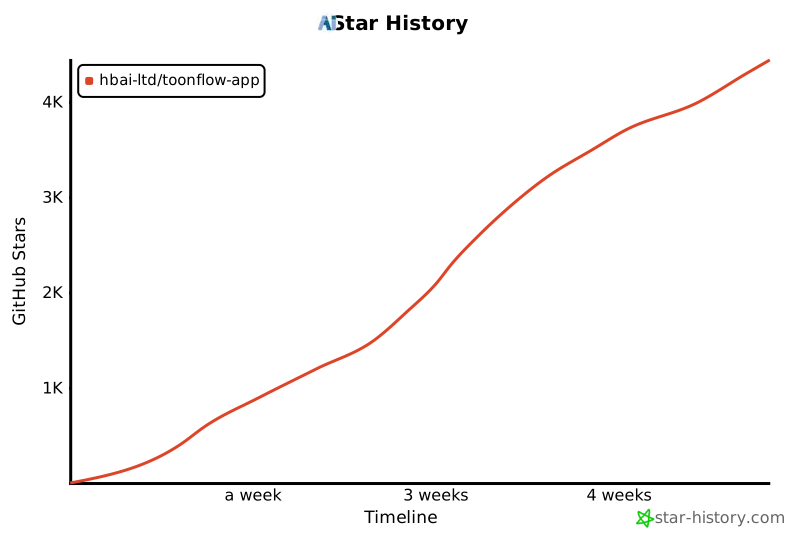](https://www.star-history.com/#HBAI-Ltd/Toonflow-app&type=timeline&legend=top-left)
|
||
|
||
---
|
||
|
||
|
||
# 🙏 致謝
|
||
|
||
感謝以下開源專案為 Toonflow 提供強大支援:
|
||
|
||
- [Express](https://expressjs.com/) - 快速、開放、極簡的 Node.js Web 框架
|
||
- [AI SDK](https://ai-sdk.dev/) - 面向 TypeScript 的 AI 工具包
|
||
- [Better-SQLite3](https://github.com/WiseLibs/better-sqlite3) - 高效能 SQLite3 綁定庫
|
||
- [Sharp](https://sharp.pixelplumbing.com/) - 高效能 Node.js 圖像處理庫
|
||
- [Axios](https://axios-http.com/) - 基於 Promise 的 HTTP 客戶端
|
||
- [Zod](https://zod.dev/) - TypeScript 優先的模式驗證庫
|
||
- [Socket.IO](https://socket.io/) - 即時雙向事件通訊引擎
|
||
- [Electron](https://www.electronjs.org/) - 跨平台桌面應用開發框架
|
||
- [Hugging Face Transformers](https://huggingface.co/docs/transformers.js) - 本地 ML 推理庫
|
||
|
||
感謝以下組織/單位/個人為 Toonflow 提供支援:
|
||
|
||
<table>
|
||
<thead>
|
||
<tr>
|
||
<th align="center">Logo</th>
|
||
<th align="center">名稱</th>
|
||
<th align="center">支援方式</th>
|
||
<th>簡介</th>
|
||
<th align="center">官網</th>
|
||
</tr>
|
||
</thead>
|
||
<tbody>
|
||
<tr>
|
||
<td align="center"><img src="./docs/sponsored/sophnet.png" alt="算能雲 Logo" width="48"></td>
|
||
<td align="center"><b>算能雲</b></td>
|
||
<td align="center">💻 算力贊助</td>
|
||
<td>致力於打造更快、更穩、更省的一站式模型推理API服務平台</td>
|
||
<td align="center"><a href="https://www.sophnet.com/">官網</a></td>
|
||
</tr>
|
||
<tr>
|
||
<td align="center"><img src="./docs/sponsored/atlascloud.png" alt="Atlas Cloud Logo" width="48"></td>
|
||
<td align="center"><b>Atlas Cloud</b></td>
|
||
<td align="center">💻 算力贊助</td>
|
||
<td>全球首個全模態推理平台。對話、圖像、影片、音訊——全部統一 API。300+ 模型,OpenAI 相容。</td>
|
||
<td align="center"><a href="https://www.atlascloud.ai/">官網</a></td>
|
||
</tr>
|
||
<tr>
|
||
<td align="center"><img src="./docs/sponsored/hunyuan.webp" alt="騰訊混元3D Logo" width="48"></td>
|
||
<td align="center"><b>騰訊混元3D</b></td>
|
||
<td align="center">🌐 世界模型技術支援</td>
|
||
<td>騰訊混元3D AI創作引擎基於騰訊混元3D生成大模型2.5版本,業界首個一站式3D內容AI創作平台。具備文生、圖生3D、3D動畫生成、紋理生成等功能,支援草圖生3D、3D人物生成,有低多邊形模型生成優勢。</td>
|
||
<td align="center"><a href="https://3d.hunyuan.tencent.com/">官網</a></td>
|
||
</tr>
|
||
</tbody>
|
||
</table>
|
||
|
||
完整的第三方依賴清單請查閱 `NOTICES.txt`
|
||
|
||
##### copyright © 北京愛阿科技有限公司
|
||
|
||
|
||
|
||
<img src="https://capsule-render.vercel.app/api?type=waving&color=gradient&customColorList=6,11,20&height=100§ion=footer" width="100%"/> |