
563 lines
20 KiB
Markdown
563 lines
20 KiB
Markdown
<p>
|
||
<a href="https://github.com/HBAI-Ltd/Toonflow-app">
|
||
<img src="https://img.shields.io/badge/GitHub-181717?style=flat-square&logo=github&logoColor=white" alt="GitHub" />
|
||
</a>
|
||
|
|
||
<a href="https://gitee.com/HBAI-Ltd/Toonflow-app">
|
||
<img src="https://img.shields.io/badge/Gitee-C71D23?style=flat-square&logo=gitee&logoColor=white" alt="Gitee" />
|
||
</a>
|
||
|
|
||
<a href="https://gitcode.com/HBAI-Ltd/Toonflow-app">
|
||
<img src="./atomgitLogo.png" alt="Atomgit" style="height:16px"/>
|
||
Atomgit
|
||
</a>
|
||
</p>
|
||
|
||
<p align="center">
|
||
<a href="/README.md">簡体字中国語</a> |
|
||
<a href="./README.zhtw.md">繁体字中国語</a> |
|
||
<a href="./README.en.md">英語</a> |
|
||
<a href="./README.th.md">タイ語</a> |
|
||
<a href="./README.vi.md">ベトナム語</a> |
|
||
<strong>日本語</strong> |
|
||
<a href="./README.ru.md">ロシア語</a>
|
||
</p>
|
||
|
||
<div align="center">
|
||
|
||
<img src="./logo.png" alt="Toonflow Logo" height="120"/>
|
||
|
||
# Toonflow
|
||
|
||
<p align="center">
|
||
<b>
|
||
AI短編ドラマ工場
|
||
<br />
|
||
指先ひとつで、小説が瞬時にドラマ化!
|
||
<br />
|
||
AI脚本 × AI映像 × 超高速生成 🔥
|
||
</b>
|
||
</p>
|
||
<p align="center">
|
||
<a href="https://github.com/HBAI-Ltd/Toonflow-app/stargazers">
|
||
<img src="https://img.shields.io/github/stars/HBAI-Ltd/Toonflow-app?style=for-the-badge&logo=github" alt="Stars Badge" />
|
||
</a>
|
||
<a href="https://www.apache.org/licenses/LICENSE-2.0" target="_blank">
|
||
<img src="https://img.shields.io/badge/License-Apache%202.0-blue.svg?style=for-the-badge" alt="Apache-2.0 License Badge" />
|
||
</a>
|
||
<a href="https://github.com/HBAI-Ltd/Toonflow-app/releases">
|
||
<img alt="release" src="https://img.shields.io/github/v/release/HBAI-Ltd/Toonflow-app?style=for-the-badge" />
|
||
</a>
|
||
</p>
|
||
|
||
> 🚀 **ワンストップ短編ドラマ制作**:テキストからキャラクター、絵コンテ、映像まで、0知識でAI化された全プロセス。創作効率10倍以上!
|
||
</div>
|
||
|
||
---
|
||
|
||
# 🌟 主な機能
|
||
|
||
ToonflowはAI短編漫画/ドラマ制作ツールで、小説をAIが自動的に脚本化し、AI生成画像・映像と組み合わせて高効率な短編ドラマ制作を実現します。Toonflowにより、テキストから映像までの流れを簡単に完結でき、短編ドラマ制作がよりスマート&便利になります。
|
||
|
||
- ✅ **キャラクター生成**
|
||
元の小説テキストを自動分析し、外見・性格・身分など詳細なキャラクター設定をスマートに識別・生成。脚本・作画の基盤を提供します。
|
||
- ✅ **脚本生成**
|
||
選択したエピソードや章に基づき、構造化された脚本(セリフ・シーン描写・ストーリー展開など)をシステムが自動生成。小説から映像脚本への効率的な変換を実現します。
|
||
- ✅ **絵コンテ作成**
|
||
脚本内容に基づき、AIが適切な絵コンテプロンプトや画面設計を生成。前景・中景・背景、キャラクター動作、小道具設計、場面レイアウトを細分化し、脚本からビデオへの完全なルートマップを自動構築します。
|
||
- ✅ **動画合成**
|
||
AI画像と動画技術を統合し、AI生成により映像クリップの作成が可能。オンライン編集と個別調整にも対応し、映像創作の効率アップ&迅速実現をサポートします。
|
||
|
||
---
|
||
|
||
# 📦 利用シーン
|
||
|
||
- ショート動画コンテンツ制作
|
||
- 小説の映像化実験
|
||
- AI文学改編ツール
|
||
- 脚本開発&高速プロトタイピング
|
||
- 動画素材生成
|
||
|
||
---
|
||
|
||
# 🔰 使い方ガイド
|
||
|
||
## 📺 動画チュートリアル
|
||
|
||
https://www.bilibili.com/video/BV1na6wB6Ea2
|
||
[](https://www.bilibili.com/video/BV1na6wB6Ea2)
|
||
|
||
**Toonflow 8分クイックスタートAI動画**
|
||
👉 [クリックして見る](https://www.bilibili.com/video/BV1na6wB6Ea2/?share_source=copy_web&vd_source=5b718c25439a901a34c7bc0c1d35b38e)
|
||
|
||
📱 スマホWeChatでQRコードをスキャンして視聴
|
||
|
||
<img src="./videoQR.png" alt="微信扫码观看" width="150"/>
|
||
|
||
---
|
||
|
||
# 🚀 インストール
|
||
|
||
## 前提条件
|
||
|
||
本ソフトウェアのインストール・利用前に以下をご用意ください:
|
||
|
||
- ✅ 大規模言語モデルAIサービスのエンドポイント
|
||
- ✅ SoraまたはDoubao動画サービスAPI
|
||
- ✅ Nano Banana Pro画像生成モデルAPI
|
||
|
||
## ローカルインストール
|
||
|
||
### 1. ダウンロード&インストール
|
||
|
||
| OS | GitHubダウンロード | Quark(夸克)クラウドダウンロード | 説明 |
|
||
| :--------: | :----------------------------------------------------- | :---------------------------------------------- | :--------------- |
|
||
| Windows | [Release](https://github.com/HBAI-Ltd/Toonflow-app/releases) | [夸克クラウド](https://pan.quark.cn/s/94ef07509df0) | 公式配布インストーラ |
|
||
| Linux | [Release](https://github.com/HBAI-Ltd/Toonflow-app/releases) | [夸克クラウド](https://pan.quark.cn/s/94ef07509df0) | 公式配布インストーラ |
|
||
| macOS | [Release](https://github.com/HBAI-Ltd/Toonflow-app/releases) | [夸克クラウド](https://pan.quark.cn/s/94ef07509df0) | 公式配布インストーラ |
|
||
|
||
> [!CAUTION]
|
||
> MacOSの場合は、設定→プライバシーとセキュリティでセキュリティ設定を許可してください。証明書問題でアプリが開かない場合があります。
|
||
>
|
||
> 参考:知乎ドキュメント:[https://www.zhihu.com/question/433389276](https://www.zhihu.com/question/433389276)
|
||
|
||
> Gitee OSの制限とReleaseファイルのサイズ上限により、Gitee側のReleaseダウンロードは現在未提供です。
|
||
|
||
### 2. サービス起動
|
||
|
||
インストール後、アプリを起動してください。
|
||
|
||
> ⚠️ **初回ログイン**
|
||
> アカウント:`admin`
|
||
> パスワード:`admin123`
|
||
|
||
## Dockerデプロイ
|
||
|
||
### 前提条件
|
||
|
||
- [Docker](https://docs.docker.com/get-docker/)(バージョン 20.10以上)インストール済み
|
||
|
||
### 方法1:オンラインデプロイ
|
||
|
||
現在準備中。しばらくはローカルビルドをご利用ください。
|
||
|
||
### 方法2:ローカルビルド
|
||
|
||
お手持ちのソースコードから直接ビルド。開発者またはリポジトリクローン済ユーザー向け(git要インストール)。
|
||
|
||
```shell
|
||
# まずプロジェクトをクローン(既にある場合は省略可)
|
||
git clone https://github.com/HBAI-Ltd/Toonflow-app.git
|
||
cd Toonflow-app
|
||
|
||
# docker-composeでローカルビルド&起動
|
||
yarn docker:local
|
||
|
||
# または手動ビルド
|
||
docker build -t toonflow .
|
||
docker run -d -p <ローカルポート>:10588 -v <ローカルデータパス>:/app/data toonflow
|
||
|
||
# 指定ポートの /web/index.html でアクセス可
|
||
# 例)http://localhost:10588/web/index.html
|
||
```
|
||
|
||
### サービスポート情報
|
||
|
||
| ポート | 用途 | デプロイマッピング |
|
||
| ------- | -------- | ------------- |
|
||
| `10588` | UI | `10588:10588` |
|
||
|
||
**環境変数メモ:**
|
||
|
||
| 変数 | 説明 |
|
||
| ------------ | -------------------------- |
|
||
| `NODE_ENV` | 実行環境、`prod`が本番 |
|
||
| `PORT` | サービスポート(デフォルト10588) |
|
||
| `OSSURL` | ファイル保存URL(静的リソース) |
|
||
|
||
---
|
||
|
||
## クラウドデプロイ
|
||
|
||
### 1. サーバー環境要件
|
||
|
||
- **OS**:Ubuntu 20.04以上/CentOS 7以上
|
||
- **Node.js**:24.x(推奨、最低23.11.1以上)
|
||
- **メモリ**:2GB以上
|
||
|
||
### 2. サーバーデプロイ
|
||
|
||
#### 1. 環境インストール
|
||
|
||
```bash
|
||
# Node.jsインストール
|
||
curl -o- https://raw.githubusercontent.com/nvm-sh/nvm/v0.39.7/install.sh | bash
|
||
source ~/.bashrc
|
||
nvm install 24
|
||
# YarnとPM2インストール
|
||
npm install -g yarn pm2
|
||
```
|
||
|
||
#### 2. プロジェクト導入
|
||
|
||
**GitHubからクローン:**
|
||
|
||
```bash
|
||
cd /opt
|
||
git clone https://github.com/HBAI-Ltd/Toonflow-app.git
|
||
cd Toonflow-app
|
||
yarn install
|
||
yarn build
|
||
```
|
||
|
||
**Giteeからクローン(中国国内推奨):**
|
||
|
||
```bash
|
||
cd /opt
|
||
git clone https://gitee.com/HBAI-Ltd/Toonflow-app.git
|
||
cd Toonflow-app
|
||
yarn install
|
||
yarn build
|
||
```
|
||
|
||
#### 3. PM2構成
|
||
|
||
`pm2.json`ファイルを作成:
|
||
|
||
```json
|
||
{
|
||
"name": "toonflow-app",
|
||
"script": "data/serve/app.js",
|
||
"instances": "max",
|
||
"exec_mode": "cluster",
|
||
"env": {
|
||
"NODE_ENV": "prod",
|
||
"PORT": 10588,
|
||
"OSSURL": "http://127.0.0.1:10588/"
|
||
}
|
||
}
|
||
```
|
||
|
||
**環境変数説明:**
|
||
|
||
| 変数 | 説明 |
|
||
| ------------ | -------------------------- |
|
||
| `NODE_ENV` | 実行環境、`prod`が本番 |
|
||
| `PORT` | サービスポート |
|
||
| `OSSURL` | ファイル保存URL(静的リソース) |
|
||
|
||
---
|
||
|
||
#### 4. サービス起動
|
||
|
||
```bash
|
||
pm2 start pm2.json
|
||
pm2 startup
|
||
pm2 save
|
||
```
|
||
|
||
#### 5. よく使うコマンド
|
||
|
||
```bash
|
||
pm2 list # プロセス一覧
|
||
pm2 logs toonflow-app # ログを見る
|
||
pm2 restart all # サービス再起動
|
||
pm2 monit # 監視パネル
|
||
```
|
||
|
||
> ⚠️ **初回ログイン**
|
||
> アカウント:`admin`
|
||
> パスワード:`admin123`
|
||
|
||
#### 6. フロントエンドのデプロイ
|
||
|
||
前端の分離デプロイやカスタマイズが必要な場合はこちら:
|
||
|
||
- **GitHub**:[Toonflow-web](https://github.com/HBAI-Ltd/Toonflow-web)
|
||
- **Gitee**:[Toonflow-web](https://gitee.com/HBAI-Ltd/Toonflow-web)
|
||
|
||
> 💡 **補足**:このリポジトリにはビルド済のフロントリソースが内蔵済み。通常ユーザーはフロント分離構築は不要。フロントリポジトリはカスタム開発用です。
|
||
|
||
---
|
||
|
||
# 🔧 開発フローガイド
|
||
|
||
> [!CAUTION]
|
||
> 🚧 **PR提出ガイドライン** 🚧
|
||
>
|
||
> ⛔ `master`ブランチはPR不可 | ✅ `develop`ブランチにPR提出
|
||
>
|
||
> 開発者のご参加を歓迎します。参加希望はコミュニティで主催者ACTにご連絡ください。
|
||
|
||
## 🛠️ 技術スタック
|
||
|
||
| カテゴリ | 技術 |
|
||
| -------------- | ---------------------------------------------------------------------------------------- |
|
||
| ランタイム | Node.js 23.11.1+ |
|
||
| 言語 | TypeScript 5.x |
|
||
| バックエンド | Express 5 |
|
||
| データベース | SQLite(better-sqlite3 / knex) |
|
||
| AI連携 | Vercel AI SDK(OpenAI / Anthropic / Google / DeepSeek / 智谱 / MiniMax / 通義千問 / xAI) |
|
||
| ローカル推論 | @huggingface/transformers(ONNX) |
|
||
| リアルタイム通信 | Socket.IO |
|
||
| デスクトップ | Electron 40 |
|
||
| 画像処理 | Sharp |
|
||
| コンテナ化 | Docker |
|
||
|
||
## 開発環境準備
|
||
|
||
- **Node.js**:バージョン23.11.1以上
|
||
- **Yarn**:パッケージマネージャ推奨
|
||
|
||
## プロジェクトのクイック起動
|
||
|
||
1. **プロジェクトクローン**
|
||
|
||
**GitHubからクローン:**
|
||
|
||
```bash
|
||
git clone https://github.com/HBAI-Ltd/Toonflow-app.git
|
||
cd Toonflow-app
|
||
```
|
||
|
||
**Giteeからクローン(中国国内推奨):**
|
||
|
||
```bash
|
||
git clone https://gitee.com/HBAI-Ltd/Toonflow-app.git
|
||
cd Toonflow-app
|
||
```
|
||
|
||
2. **依存パッケージインストール**
|
||
|
||
プロジェクト直下で次を実行:
|
||
|
||
```bash
|
||
yarn install
|
||
```
|
||
|
||
3. **開発環境の起動**
|
||
|
||
本プロジェクトは**バックエンドAPIサービス**と**フロントエンド**があります。次から用途を選択。
|
||
|
||
- **方法1:バックエンドのみ起動**
|
||
|
||
```bash
|
||
yarn dev
|
||
```
|
||
|
||
> ⚠️ このコマンドはAPIサーバー(ポート10588)のみ起動。`http://localhost:10588`でAPIのみ利用。GUI表示にはフロントプロジェクトの起動または下記のGUIモードをご利用ください。
|
||
|
||
- **方法2:Electronデスクトップクライアント**
|
||
|
||
```bash
|
||
yarn dev:gui
|
||
```
|
||
|
||
> バックエンドとElectronウィンドウが同時起動。内蔵フロント付きで即利用OK。すべての機能を体験したい方向け。
|
||
|
||
- **方法3:本番モードで起動**
|
||
|
||
```bash
|
||
yarn start
|
||
```
|
||
|
||
> 本番モードでビルド済サービスを直接起動(`yarn build`が必要)。
|
||
|
||
4. **プロジェクトパッケージ化**
|
||
|
||
- TypeScriptファイルのビルド:
|
||
|
||
```bash
|
||
yarn build
|
||
```
|
||
|
||
- Windows用実行ファイル化:
|
||
|
||
```bash
|
||
yarn dist:win
|
||
```
|
||
|
||
- Mac用実行ファイル化:
|
||
|
||
```bash
|
||
yarn dist:mac
|
||
```
|
||
|
||
- Linux用実行ファイル化:
|
||
|
||
```bash
|
||
yarn dist:linux
|
||
```
|
||
|
||
5. **コード品質チェック**
|
||
|
||
- グローバルLintチェック:
|
||
|
||
```bash
|
||
yarn lint
|
||
```
|
||
|
||
6. **AIデバッグパネル(任意)**
|
||
|
||
AI SDKのGUIデバッグツール。AI呼び出しのデバッグに便利。
|
||
|
||
```bash
|
||
yarn debug:ai
|
||
```
|
||
|
||
## フロントエンド開発
|
||
|
||
フロントUIの修正はフロントエンドリポジトリへ:
|
||
|
||
- **GitHub**:[Toonflow-web](https://github.com/HBAI-Ltd/Toonflow-web)
|
||
- **Gitee**:[Toonflow-web](https://gitee.com/HBAI-Ltd/Toonflow-web)
|
||
|
||
ビルド後、`dist`以下を本プロジェクト `data/web`へコピーで統合完了。
|
||
|
||
## プロジェクト構成
|
||
|
||
```
|
||
📂 build/ # ビルド成果物
|
||
📂 data/ # 実行時データ
|
||
│ ├─ 📂 models/ # ローカル推論モデル(ONNX)
|
||
│ ├─ 📂 oss/ # オブジェクトストレージ(素材/キャラ/背景)
|
||
│ ├─ 📂 serve/ # 本番エントリ
|
||
│ ├─ 📂 skills/ # Agentプロンプト集
|
||
│ └─ 📂 web/ # ビルトインフロント
|
||
📂 docs/ # ドキュメントリソース
|
||
📂 env/ # 環境設定
|
||
📂 scripts/ # ビルド&ツールスクリプト
|
||
📂 src/
|
||
├─ 📂 agents/ # AI Agentモジュール
|
||
│ ├─ 📂 productionAgent/ # プロダクション用Agent
|
||
│ └─ 📂 scriptAgent/ # 脚本Agent
|
||
├─ 📂 lib/ # 共通ライブラリ(DB初期化等)
|
||
├─ 📂 middleware/ # ミドルウェア
|
||
├─ 📂 routes/ # ルーティングモジュール
|
||
│ ├─ 📂 agents/ # Agentメモリ管理
|
||
│ ├─ 📂 artStyle/ # 画風管理
|
||
│ ├─ 📂 assets/ # 素材管理
|
||
│ ├─ 📂 assetsGenerate/ # 素材生成
|
||
│ ├─ 📂 cornerScape/ # 絵コンテ管理
|
||
│ ├─ 📂 general/ # 共通API
|
||
│ ├─ 📂 login/ # ログイン認証
|
||
│ ├─ 📂 migrate/ # データ移行
|
||
│ ├─ 📂 modelSelect/ # モデル選択
|
||
│ ├─ 📂 novel/ # 小説管理
|
||
│ ├─ 📂 other/ # その他機能
|
||
│ ├─ 📂 production/ # 制作管理
|
||
│ ├─ 📂 project/ # プロジェクト管理
|
||
│ ├─ 📂 script/ # 脚本生成
|
||
│ ├─ 📂 scriptAgent/ # 脚本AgentAPI
|
||
│ ├─ 📂 setting/ # システム設定
|
||
│ ├─ 📂 task/ # タスク管理
|
||
│ └─ 📂 test/ # テストAPI
|
||
├─ 📂 socket/ # WebSocket通信
|
||
├─ 📂 types/ # TypeScript型
|
||
├─ 📂 utils/ # ユーティリティ
|
||
├─ 📄 app.ts # アプリエントリ
|
||
├─ 📄 core.ts # コア初期化
|
||
├─ 📄 env.ts # 環境変数処理
|
||
├─ 📄 err.ts # エラーハンドラ
|
||
├─ 📄 logger.ts # ロギング
|
||
├─ 📄 router.ts # ルート登録
|
||
└─ 📄 utils.ts # 共通ツール
|
||
📄 Dockerfile # Dockerビルド
|
||
📄 electron-builder.yml # Electronパッケージ設定
|
||
📄 skillList.json # スキルリスト
|
||
📄 LICENSE # ライセンス(Apache-2.0)
|
||
📄 NOTICES.txt # サードパーティ依存リスト
|
||
📄 package.json # プロジェクト設定
|
||
📄 tsconfig.json # TypeScript設定
|
||
```
|
||
|
||
---
|
||
|
||
# 🔗 関連リポジトリ
|
||
|
||
| リポジトリ | 説明 | GitHub | Gitee |
|
||
| ------------------ | ---------------------------------- | -------------------------------------------------- | ------------------------------------------------ |
|
||
| **Toonflow-app** | フルクライアント(本リポジトリ、一般ユーザー向け) | [GitHub](https://github.com/HBAI-Ltd/Toonflow-app) | [Gitee](https://gitee.com/HBAI-Ltd/Toonflow-app) |
|
||
| **Toonflow-web** | フロントエンドソース(フロントエンド開発者向け) | [GitHub](https://github.com/HBAI-Ltd/Toonflow-web) | [Gitee](https://gitee.com/HBAI-Ltd/Toonflow-web) |
|
||
|
||
> 💡 **ヒント**:Toonflowを利用したいだけなら本リポジトリをそのままダウンロードすればOK。フロントリポジトリはフロントカスタマイズや2次開発者向けです。
|
||
|
||
---
|
||
|
||
# 👨👩👧👦 WeChatコミュニティグループ
|
||
|
||
~~グループ1~~
|
||
|
||
~~グループ2~~
|
||
|
||
...
|
||
|
||
~~グループ10~~
|
||
|
||
~~グループ11~~
|
||
|
||
~~グループ12~~
|
||
|
||
~~グループ13~~
|
||
|
||
...
|
||
|
||
~~グループ24~~
|
||
|
||
グループ招待アシスタント:
|
||
|
||
<img src="./QR.png" alt="Toonflow QR" height="400"/>
|
||
|
||
---
|
||
|
||
# 💌 お問い合わせ
|
||
|
||
📧 メール:[ltlctools@outlook.com](mailto:ltlctools@outlook.com?subject=Toonflow相談)
|
||
|
||
---
|
||
|
||
# 📜 ライセンス
|
||
|
||
ToonflowはApache-2.0ライセンスでオープンソース公開されています。詳細はこちら:https://www.apache.org/licenses/LICENSE-2.0
|
||
|
||
Apache-2.0規約に基づき、Toonflowは商用を含むあらゆる利用が可能です。
|
||
|
||
---
|
||
|
||
# ⭐️ スター履歴
|
||
|
||
[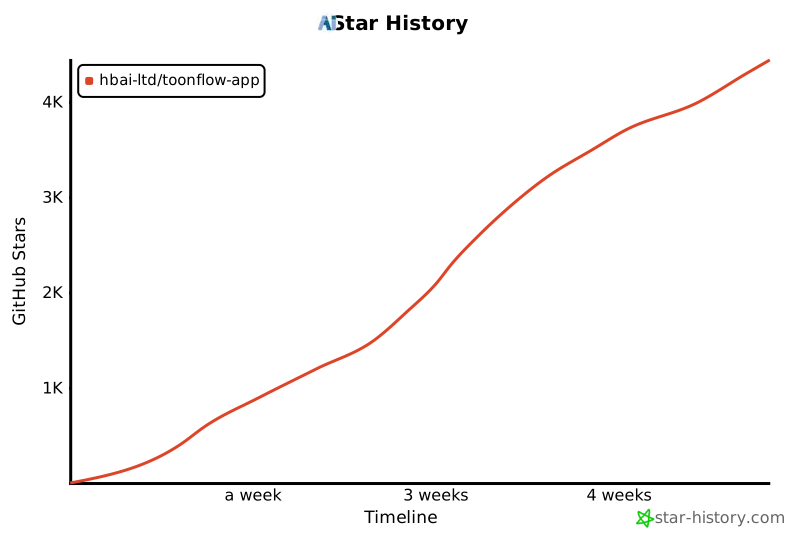](https://www.star-history.com/#HBAI-Ltd/Toonflow-app&type=timeline&legend=top-left)
|
||
|
||
---
|
||
|
||
# 🙏 謝辞
|
||
|
||
以下のオープンソースプロジェクトの強力な支援に感謝します:
|
||
|
||
- [Express](https://expressjs.com/) - 高速・オープンなNode.js Webフレームワーク
|
||
- [AI SDK](https://ai-sdk.dev/) - TypeScript向けAIツールキット
|
||
- [Better-SQLite3](https://github.com/WiseLibs/better-sqlite3) - 高性能SQLite3バインディング
|
||
- [Sharp](https://sharp.pixelplumbing.com/) - 高速Node.js画像処理
|
||
- [Axios](https://axios-http.com/) - PromiseベースHTTPクライアント
|
||
- [Zod](https://zod.dev/) - TypeScript優先のバリデーション
|
||
- [Socket.IO](https://socket.io/) - リアルタイム双方向通信エンジン
|
||
- [Electron](https://www.electronjs.org/) - クロスプラットフォームデスクトップ開発
|
||
- [Hugging Face Transformers](https://huggingface.co/docs/transformers.js) - ローカル機械学習推論ライブラリ
|
||
|
||
以下の組織・団体・個人によるToonflowへの協力に感謝します:
|
||
|
||
<table>
|
||
<tr>
|
||
<td>
|
||
<img src="./sponsored/sophnet.png" alt="算能云 Logo" width="48">
|
||
</td>
|
||
<td>
|
||
<b>算能云</b> よりコンピューティング協賛
|
||
<a href="https://www.sophnet.com/">[公式サイト]</a>
|
||
</td>
|
||
</tr>
|
||
</table>
|
||
|
||
第三者依存リストは `NOTICES.txt` をご覧ください
|
||
|
||
</translate_input> |