
714 lines
31 KiB
Markdown
714 lines
31 KiB
Markdown
<img src="https://capsule-render.vercel.app/api?type=waving&color=gradient&customColorList=6,11,20&height=200§ion=header&text=Toonflow&fontSize=90&fontColor=ffffff&animation=fadeIn&fontAlignY=50" width="100%"/>
|
||
|
||
<p>
|
||
<a href="https://github.com/HBAI-Ltd/Toonflow-app">
|
||
<img src="https://img.shields.io/badge/GitHub-181717?style=flat-square&logo=github&logoColor=white" alt="GitHub" />
|
||
</a>
|
||
|
|
||
<a href="https://gitee.com/HBAI-Ltd/Toonflow-app">
|
||
<img src="https://img.shields.io/badge/Gitee-C71D23?style=flat-square&logo=gitee&logoColor=white" alt="Gitee" />
|
||
</a>
|
||
|
|
||
<a href="https://gitcode.com/HBAI-Ltd/Toonflow-app">
|
||
<img src="./atomgitLogo.svg" alt="Atomgit" style="height:20px"/>
|
||
</a>
|
||
</p>
|
||
|
||
<p align="center">
|
||
<a href="../README.md">简体中文</a> |
|
||
<a href="./README.zhtw.md">繁體中文</a> |
|
||
<a href="./README.en.md">English</a> |
|
||
<a href="./README.th.md">ไทย</a> |
|
||
<a href="./README.vi.md">Tiếng Việt</a> |
|
||
<strong>日本語</strong> |
|
||
<a href="./README.ru.md">Русский</a>
|
||
</p>
|
||
|
||
<div align="center">
|
||
|
||
<img src="./logo.png" alt="Toonflow Logo" height="120"/>
|
||
|
||
# Toonflow
|
||
|
||
<p align="center">
|
||
<b>
|
||
AI ショートドラマ制作スタジオ
|
||
<br />
|
||
指先一つで、小説があっという間にドラマに!
|
||
<br />
|
||
AI脚本 × AI映像 × 超高速生成 🔥
|
||
</b>
|
||
</p>
|
||
<p align="center">
|
||
<a href="https://github.com/HBAI-Ltd/Toonflow-app/stargazers">
|
||
<img src="https://img.shields.io/github/stars/HBAI-Ltd/Toonflow-app?style=for-the-badge&logo=github" alt="Stars Badge" />
|
||
</a>
|
||
<a href="https://www.apache.org/licenses/LICENSE-2.0" target="_blank">
|
||
<img src="https://img.shields.io/badge/License-Apache%202.0-blue.svg?style=for-the-badge" alt="Apache-2.0 License Badge" />
|
||
</a>
|
||
<a href="https://github.com/HBAI-Ltd/Toonflow-app/releases">
|
||
<img alt="release" src="https://img.shields.io/github/v/release/HBAI-Ltd/Toonflow-app?style=for-the-badge" />
|
||
</a>
|
||
</p>
|
||
<p align="center">
|
||
<a href="https://github.com/HBAI-Ltd/Toonflow-app/network/members">
|
||
<img src="https://img.shields.io/github/forks/HBAI-Ltd/Toonflow-app?style=for-the-badge&logo=github&color=orange" alt="Forks Badge" />
|
||
</a>
|
||
<a href="https://atomgit.com/HBAI-Ltd/Toonflow-app">
|
||
<img src="https://img.shields.io/badge/AtomGit-G--Star%20No.540-FF6B35?style=for-the-badge&logo=git&logoColor=white" alt="AtomGit G-Star No.540" />
|
||
</a>
|
||
<a href="https://discord.gg/HEjKmpNpAZ">
|
||
<img src="https://img.shields.io/badge/Discord-Community-5865F2?style=for-the-badge&logo=discord&logoColor=white" alt="Discord" />
|
||
</a>
|
||
</p>
|
||
<p align="center">
|
||
<a href="https://github.com/HBAI-Ltd/Toonflow-app/issues">
|
||
<img src="https://img.shields.io/github/issues/HBAI-Ltd/Toonflow-app?style=for-the-badge&color=F48D73" alt="Issues" />
|
||
</a>
|
||
<a href="https://github.com/HBAI-Ltd/Toonflow-app/graphs/contributors">
|
||
<img src="https://img.shields.io/github/contributors/HBAI-Ltd/Toonflow-app?style=for-the-badge&color=2088FF" alt="Contributors" />
|
||
</a>
|
||
<a href="https://github.com/HBAI-Ltd/Toonflow-app/commits">
|
||
<img src="https://img.shields.io/github/last-commit/HBAI-Ltd/Toonflow-app?style=for-the-badge&color=blueviolet" alt="Last Commit" />
|
||
</a>
|
||
</p>
|
||
<p align="center">
|
||
<img src="https://ziadoua.github.io/m3-Markdown-Badges/badges/TypeScript/typescript2.svg" alt="TypeScript" />
|
||
<img src="https://ziadoua.github.io/m3-Markdown-Badges/badges/NodeJS/nodejs2.svg" alt="Node.js" />
|
||
<img src="https://ziadoua.github.io/m3-Markdown-Badges/badges/Docker/docker2.svg" alt="Docker" />
|
||
<img src="https://ziadoua.github.io/m3-Markdown-Badges/badges/Electron/electron2.svg" alt="Electron" />
|
||
</p>
|
||
<p align="center">
|
||
<img src="https://mobaicons.com/icons/typescript,nodejs,electron,docker,socket?perline=5" alt="Tech Stack Icons" />
|
||
</p>
|
||
<p align="center">
|
||
<img src="https://widgetbite.com/stats/HBAI-Ltd" alt="Visitors" />
|
||
</p>
|
||
|
||
> 🚀 **オールインワン制作環境**:テキストからキャラクター、絵コンテから動画まで。
|
||
専門知識ゼロでも全プロセスをAIが**アシスト**し、創作効率を10倍以上に引き上げます!
|
||
</div>
|
||
|
||
<div align="center">
|
||
<img src="./g-star.png" alt="AtomGit G-Star 認定証" height="300"/>
|
||
</div>
|
||
|
||
---
|
||
|
||
# 🌐 多言語対応
|
||
|
||
Toonflow は以下の言語インターフェースに対応しています:
|
||
|
||
| 言語 | Language |
|
||
|------|----------|
|
||
| 简体中文 | Chinese (Simplified) |
|
||
| 繁體中文 | Chinese (Traditional) |
|
||
| English | English |
|
||
| ไทย | Thai |
|
||
| Tiếng Việt | Vietnamese |
|
||
| 日本語 | Japanese |
|
||
| Русский | Russian |
|
||
|
||
> 💡 さらに多くの言語に対応予定です。多言語翻訳へのご協力(貢献)を歓迎します!
|
||
|
||
---
|
||
|
||
# 🌟 主な機能
|
||
|
||
Toonflow は、AI技術を活用して小説を自動的に脚本へ変換し、AIが生成した画像や動画と組み合わせることで、効率的なショートドラマ制作を強力に**アシスト**するツールです。Toonflow を使えば、テキストから映像までの全工程を簡単に完結でき、ドラマ制作がよりスマートで便利になります。
|
||
|
||
- ✅ **キャラクター生成** 原作の小説テキストを自動分析し、容姿、性格、身分などの詳細情報をインテリジェントに認識・生成します。これにより、後の脚本や画面作りにおいて信頼できる土台を提供します。
|
||
|
||
- ✅ **脚本生成** 選択したイベントや章に基づき、セリフ、シーンの描写、ストーリー展開を含む構造化された脚本を自動生成します。文学テキストから映像用脚本への高効率な変換を**アシスト**します。
|
||
|
||
- ✅ **絵コンテ制作** 脚本の内容から、絵コンテ用のプロンプト(指示文)と画面構成をインテリジェントに生成します。前景・中景・背景、キャラクターの動き、小道具の配置などを細分化し、動画制作の道筋を完全に**アシスト**します。
|
||
|
||
- ✅ **動画合成** AI画像および動画技術を統合し、AIによる動画クリップ生成を可能にします。オンライン編集機能も備えており、個別の微調整に対応。映像制作の効率的な連携とスピーディな完成を**アシスト**します。
|
||
|
||
---
|
||
|
||
# 📦 活用シーン
|
||
|
||
- ショート動画コンテンツの制作
|
||
- 小説の映像化テスト
|
||
- AIによる文学作品の翻案(脚色)ツール
|
||
- 脚本開発および迅速なプロトタイプ作成
|
||
- 動画素材の生成
|
||
|
||
---
|
||
|
||
# 🔰 ご利用ガイド
|
||
|
||
## 📺 動画チュートリアル
|
||
|
||
[https://www.bilibili.com/video/BV1oXD7BqEqJ](https://www.bilibili.com/video/BV1oXD7BqEqJ)
|
||
[](https://www.bilibili.com/video/BV1oXD7BqEqJ)
|
||
|
||
**Toonflow 12分でわかるクイックスタート AI動画作成**
|
||
👉 [クリックして視聴](https://www.bilibili.com/video/BV1oXD7BqEqJ/?share_source=copy_web&vd_source=5b718c25439a901a34c7bc0c1d35b38e)
|
||
|
||
📱 QRコードをスキャンして視聴
|
||
|
||
<img src="./videoQR.png" alt="WeChat スキャンして視聴" width="150"/>
|
||
|
||
---
|
||
|
||
# 📸 スクリーンショット&デモ動画
|
||
|
||
以下のスクリーンショットと動画は、Toonflowで制作したAIショートドラマのデモです。約2時間で完成し、脚本生成、絵コンテ制作および編集の全工程をカバーしています。
|
||
|
||
<table>
|
||
<tr>
|
||
<td width="50%"><a href="../screenshot/1.png"><img src="../screenshot/1.png" width="100%"/></a></td>
|
||
<td width="50%"><a href="../screenshot/2.png"><img src="../screenshot/2.png" width="100%"/></a></td>
|
||
</tr>
|
||
<tr>
|
||
<td width="50%"><a href="../screenshot/3.png"><img src="../screenshot/3.png" width="100%"/></a></td>
|
||
<td width="50%"><a href="../screenshot/4.png"><img src="../screenshot/4.png" width="100%"/></a></td>
|
||
</tr>
|
||
<tr>
|
||
<td width="50%"><a href="../screenshot/5.png"><img src="../screenshot/5.png" width="100%"/></a></td>
|
||
<td width="50%"><a href="../screenshot/6.png"><img src="../screenshot/6.png" width="100%"/></a></td>
|
||
</tr>
|
||
<tr>
|
||
<td width="50%"><a href="../screenshot/7.png"><img src="../screenshot/7.png" width="100%"/></a></td>
|
||
<td width="50%"><a href="../screenshot/8.png"><img src="../screenshot/8.png" width="100%"/></a></td>
|
||
</tr>
|
||
<tr>
|
||
<td width="50%"><a href="../screenshot/9.png"><img src="../screenshot/9.png" width="100%"/></a></td>
|
||
<td width="50%"><a href="../screenshot/10.png"><img src="../screenshot/10.png" width="100%"/></a></td>
|
||
</tr>
|
||
</table>
|
||
|
||
## デモ情報
|
||
|
||
| 項目 | 詳細 |
|
||
|------|------|
|
||
| 制作期間 | 約2時間 |
|
||
| 動画モデル | Seedance 2.0 |
|
||
| 画像モデル | GPT Image 2 |
|
||
| 言語モデル | Claude Opus 4.6 |
|
||
| 尺 | 約2分(素材3分、約1分カット)|
|
||
|
||
## コスト内訳
|
||
|
||
| 項目 | 費用 |
|
||
|------|------|
|
||
| 画像(270枚 × ¥0.04)| ¥10.8 |
|
||
| 動画(45クリップ × ¥3.5)| ¥157.5 |
|
||
| 合計 | **約¥168** |
|
||
|
||
> 📌 デモ動画の原解像度は1080×1882、公開版は480pに圧縮済みです。著作権上の問題が確認された場合は、速やかに削除対応いたします。
|
||
|
||
## デモ動画
|
||
|
||
https://github.com/user-attachments/assets/2d9fddac-dfdf-4640-b030-b09d7f7287e9
|
||
|
||
> 再生できない場合は[こちらからダウンロード](https://github.com/user-attachments/assets/2d9fddac-dfdf-4640-b030-b09d7f7287e9)してください。
|
||
|
||
---
|
||
|
||
# 🚀 インストール
|
||
|
||
## 必須環境(前提条件)
|
||
|
||
本ソフトウェアをインストールして使用する前に、以下の準備をお願いします:
|
||
|
||
- ✅ 大規模言語モデル (LLM) の AI サービス API エンドポイント
|
||
- ✅ Sora または 豆包 (Doubao) の動画サービス API エンドポイント
|
||
- ✅ Nano Banana Pro の画像生成モデルサービス API エンドポイント
|
||
|
||
## ローカル環境へのインストール
|
||
|
||
### 1. ダウンロードとインストール
|
||
|
||
| OS | GitHub | Atomgit | Quark Drive | 説明 |
|
||
| :------: | :----------------------------------------------------------- | :------------------------------------------------------------ | :---------------------------------------------- | :------------- |
|
||
| Windows | [Release](https://github.com/HBAI-Ltd/Toonflow-app/releases) | [Release](https://gitcode.com/HBAI-Ltd/Toonflow-app/releases) | [Quark Drive](https://pan.quark.cn/s/94ef07509df0) | 公式インストーラ |
|
||
| Linux | [Release](https://github.com/HBAI-Ltd/Toonflow-app/releases) | [Release](https://gitcode.com/HBAI-Ltd/Toonflow-app/releases) | [Quark Drive](https://pan.quark.cn/s/94ef07509df0) | 公式インストーラ |
|
||
| macOS | [Release](https://github.com/HBAI-Ltd/Toonflow-app/releases) | [Release](https://gitcode.com/HBAI-Ltd/Toonflow-app/releases) | [Quark Drive](https://pan.quark.cn/s/94ef07509df0) | 公式インストーラ |
|
||
|
||
> [!CAUTION]
|
||
> MacOS システムをご利用の場合、「システム設定」-「プライバシーとセキュリティ」からセキュリティ設定を行ってください。そうしないと、証明書の問題で正常に開けない場合があります。
|
||
>
|
||
> 参考ドキュメント(Zhihu):[https://www.zhihu.com/question/433389276](https://www.zhihu.com/question/433389276)
|
||
|
||
> Gitee OS 環境の制限および Release ファイルのアップロード容量制限により、現在 Gitee Release のダウンロードリンクは提供していません。
|
||
|
||
### 2. サービスの起動
|
||
|
||
インストール完了後、プログラムを起動すればサービスを利用開始できます。
|
||
|
||
> ⚠️ **初回ログイン**
|
||
> ユーザー名:`admin`
|
||
> パスワード:`admin123`
|
||
|
||
## Docker を利用した導入
|
||
|
||
### 必須環境
|
||
|
||
- [Docker](https://docs.docker.com/get-docker/) がインストール済みであること(バージョン 20.10+)
|
||
|
||
### 方法1:オンライン展開
|
||
|
||
現在準備中です。一時的にローカルでのビルドをご利用ください。
|
||
|
||
### 方法2:ローカルでのビルド
|
||
|
||
既存のソースコードを使用して直接ビルドします。開発者やリポジトリをクローンしたユーザーに適しています(ローカルに git がインストールされている必要があります):
|
||
|
||
```shell
|
||
# まずプロジェクトをクローン(既に存在する場合はスキップ)
|
||
git clone https://github.com/HBAI-Ltd/Toonflow-app.git
|
||
cd Toonflow-app
|
||
|
||
# docker-compose を使用してローカルでビルド・起動
|
||
yarn docker:local
|
||
|
||
# または手動でビルド
|
||
docker build -t toonflow .
|
||
docker run -d -p <ローカルポート>:10588 -v <ローカルデータパス>:/app/data toonflow
|
||
|
||
# これで指定したポートの /web/index.html にアクセスできます
|
||
# 例: http://localhost:10588/web/index.html
|
||
```
|
||
|
||
### サービスポートの説明
|
||
|
||
| ポート | 用途 | デプロイマッピング |
|
||
| ------- | -------- | ------------- |
|
||
| `10588` | ソフトウェア画面 | `10588:10588` |
|
||
|
||
**環境変数の説明:**
|
||
|
||
| 変数名 | 説明 |
|
||
| ---------- | ---------------------------------- |
|
||
| `NODE_ENV` | 実行環境。`prod` は本番環境を示します |
|
||
| `PORT` | サービスの待受ポート(デフォルト 10588) |
|
||
| `OSSURL` | ファイルストレージのアクセスURL(静的リソース用) |
|
||
|
||
---
|
||
|
||
## クラウド(サーバー)への導入
|
||
|
||
### 1. サーバー環境の要件
|
||
|
||
- **OS**:Ubuntu 20.04+ / CentOS 7+
|
||
- **Node.js**:24.x(推奨、最低 23.11.1+)
|
||
- **メモリ**:2GB以上
|
||
|
||
### 2. サーバーへの配置
|
||
|
||
#### 1. 環境構築
|
||
|
||
```bash
|
||
# Node.js のインストール
|
||
curl -o- https://raw.githubusercontent.com/nvm-sh/nvm/v0.39.7/install.sh | bash
|
||
source ~/.bashrc
|
||
nvm install 24
|
||
# Yarn と PM2 のインストール
|
||
npm install -g yarn pm2
|
||
```
|
||
|
||
#### 2. プロジェクトの配置
|
||
|
||
**GitHub からクローン:**
|
||
|
||
```bash
|
||
cd /opt
|
||
git clone https://github.com/HBAI-Ltd/Toonflow-app.git
|
||
cd Toonflow-app
|
||
yarn install
|
||
yarn build
|
||
```
|
||
|
||
**Gitee からクローン(中国国内推奨):**
|
||
|
||
```bash
|
||
cd /opt
|
||
git clone https://gitee.com/HBAI-Ltd/Toonflow-app.git
|
||
cd Toonflow-app
|
||
yarn install
|
||
yarn build
|
||
```
|
||
|
||
#### 3. PM2 の設定
|
||
|
||
`pm2.json` ファイルを作成します:
|
||
|
||
```json
|
||
{
|
||
"name": "toonflow-app",
|
||
"script": "data/serve/app.js",
|
||
"instances": "max",
|
||
"exec_mode": "cluster",
|
||
"env": {
|
||
"NODE_ENV": "prod",
|
||
"PORT": 10588,
|
||
"OSSURL": "http://127.0.0.1:10588/"
|
||
}
|
||
}
|
||
```
|
||
|
||
**環境変数の説明:**
|
||
|
||
| 変数名 | 説明 |
|
||
| ---------- | ---------------------------------- |
|
||
| `NODE_ENV` | 実行環境。`prod` は本番環境を示します |
|
||
| `PORT` | サービスの待受ポート |
|
||
| `OSSURL` | ファイルストレージのアクセスURL(静的リソース用) |
|
||
|
||
---
|
||
|
||
#### 4. サービスの起動
|
||
|
||
```bash
|
||
pm2 start pm2.json
|
||
pm2 startup
|
||
pm2 save
|
||
```
|
||
|
||
#### 5. よく使うコマンド
|
||
|
||
```bash
|
||
pm2 list # プロセス一覧の確認
|
||
pm2 logs toonflow-app # ログの確認
|
||
pm2 restart all # サービスの再起動
|
||
pm2 monit # 監視パネルの表示
|
||
```
|
||
|
||
> ⚠️ **初回ログイン**
|
||
> ユーザー名:`admin`
|
||
> パスワード:`admin123`
|
||
|
||
#### 6. フロントエンドサイトの配置
|
||
|
||
フロントエンド画面を単独で配置、またはカスタマイズしたい場合は、フロントエンドのリポジトリを参照してください:
|
||
|
||
- **GitHub**:[Toonflow-web](https://github.com/HBAI-Ltd/Toonflow-web)
|
||
- **Gitee**:[Toonflow-web](https://gitee.com/HBAI-Ltd/Toonflow-web)
|
||
|
||
> 💡 **補足**:本リポジトリには既にコンパイル済みのフロントエンド成果物が組み込まれているため、一般ユーザーはフロントエンドを個別に配置する必要はありません。フロントエンドのリポジトリは、二次開発を行う開発者向けです。
|
||
|
||
---
|
||
|
||
# 🔧 開発フローガイド
|
||
|
||
> [!CAUTION]
|
||
> 🚧 **PR(プルリクエスト)提出のルール** 🚧
|
||
>
|
||
> ⛔ `master` ブランチへの PR は受け付けていません | ✅ PR は `develop` ブランチへ提出してください
|
||
>
|
||
> 開発者の皆様の Toonflow への共同参加を歓迎します。興味のある方は、交流グループ内で管理者の ACT までご連絡ください。
|
||
|
||
## 🛠️ 採用技術
|
||
|
||
| カテゴリ | 技術 |
|
||
| ---------- | ----------------------------------------------------------------------------------------- |
|
||
| 実行環境 | Node.js 23.11.1+ |
|
||
| 言語 | TypeScript 5.x |
|
||
| バックエンド | Express 5 |
|
||
| データベース | SQLite(better-sqlite3 / knex) |
|
||
| AI 統合 | Vercel AI SDK(OpenAI / Anthropic / Google / DeepSeek / 智譜 / MiniMax / 通義千問 / xAI) |
|
||
| ローカル推論 | @huggingface/transformers(ONNX) |
|
||
| リアルタイム通信 | Socket.IO |
|
||
| デスクトップアプリ | Electron 40 |
|
||
| 画像処理 | Sharp |
|
||
| コンテナ化 | Docker |
|
||
|
||
## 開発環境の準備
|
||
|
||
- **Node.js**:バージョン 23.11.1 以上が必要
|
||
- **Yarn**:プロジェクトのパッケージマネージャーとして推奨
|
||
|
||
## プロジェクトのクイックスタート
|
||
|
||
1. **プロジェクトのクローン**
|
||
|
||
**GitHub からクローン:**
|
||
|
||
```bash
|
||
git clone https://github.com/HBAI-Ltd/Toonflow-app.git
|
||
cd Toonflow-app
|
||
```
|
||
|
||
**Gitee からクローン(中国国内推奨):**
|
||
|
||
```bash
|
||
git clone https://gitee.com/HBAI-Ltd/Toonflow-app.git
|
||
cd Toonflow-app
|
||
```
|
||
|
||
2. **依存関係(パッケージ)のインストール**
|
||
|
||
プロジェクトのルートディレクトリで以下のコマンドを実行します:
|
||
|
||
```bash
|
||
yarn install
|
||
```
|
||
|
||
3. **開発環境の起動**
|
||
|
||
本プロジェクトは **バックエンド API サービス** と **フロントエンド画面** の2つの部分を含みます。必要に応じて起動方法を選択してください:
|
||
|
||
- **方法1:バックエンドサービスのみ起動**
|
||
|
||
```bash
|
||
yarn dev
|
||
```
|
||
|
||
> ⚠️ このコマンドはバックエンド API サービス(ポート 10588)のみを起動し、**フロントエンド画面は含まれません**。直接 `http://localhost:10588` にアクセスしても API を呼び出せるだけで、完全な Web 画面は見えません。画面を利用する場合はフロントエンドプロジェクトを別途起動するか、以下の GUI モードを使用してください。
|
||
|
||
- **方法2:Electron デスクトップクライアントの起動**
|
||
|
||
```bash
|
||
yarn dev:gui
|
||
```
|
||
|
||
> このコマンドはバックエンドサービスと Electron のデスクトップウィンドウを同時に起動します。フロントエンド画面が内蔵されており、追加の設定なしですぐに使えます。すべての機能を体験したい開発者に最適です。
|
||
|
||
- **方法3:本番(Production)モードで起動**
|
||
|
||
```bash
|
||
yarn start
|
||
```
|
||
|
||
> コンパイル済みのサービスを本番モードで直接実行します(事前に `yarn build` を実行しておく必要があります)。
|
||
|
||
4. **プロジェクトのパッケージ化(ビルド)**
|
||
|
||
- コンパイルして TypeScript ファイルを生成:
|
||
|
||
```bash
|
||
yarn build
|
||
```
|
||
|
||
- Windows 用の実行ファイルをパッケージ化:
|
||
|
||
```bash
|
||
yarn dist:win
|
||
```
|
||
|
||
- Mac 用の実行ファイルをパッケージ化:
|
||
|
||
```bash
|
||
yarn dist:mac
|
||
```
|
||
|
||
- Linux 用の実行ファイルをパッケージ化:
|
||
|
||
```bash
|
||
yarn dist:linux
|
||
```
|
||
|
||
5. **コード品質チェック(Lint)**
|
||
|
||
- グローバルな構文およびコーディング規約のチェックを実行:
|
||
|
||
```bash
|
||
yarn lint
|
||
```
|
||
|
||
6. **AI デバッグパネル(オプション)**
|
||
|
||
AI SDK のビジュアルデバッグツールを起動し、AI の呼び出しを簡単にデバッグできます:
|
||
|
||
```bash
|
||
yarn debug:ai
|
||
```
|
||
|
||
## フロントエンド開発
|
||
|
||
フロントエンド画面を修正する必要がある場合は、フロントエンドのリポジトリで開発を行ってください:
|
||
|
||
- **GitHub**:[Toonflow-web](https://github.com/HBAI-Ltd/Toonflow-web)
|
||
- **Gitee**:[Toonflow-web](https://gitee.com/HBAI-Ltd/Toonflow-web)
|
||
|
||
フロントエンドのビルド後、`dist` ディレクトリの内容を本プロジェクトの `data/web` ディレクトリにコピーするだけで統合できます。
|
||
|
||
## プロジェクト構成
|
||
|
||
```
|
||
📂 build/ # ビルド成果物
|
||
📂 data/ # 実行時データ
|
||
│ ├─ 📂 models/ # ローカル推論モデル(ONNX)
|
||
│ ├─ 📂 oss/ # オブジェクトストレージ(素材/キャラクター/背景)
|
||
│ ├─ 📂 serve/ # 本番環境のエントリー
|
||
│ ├─ 📂 skills/ # Agent スキルのプロンプト
|
||
│ └─ 📂 web/ # フロントエンドビルド成果物(内蔵)
|
||
📂 docs/ # ドキュメントや画像リソース
|
||
📂 env/ # 環境設定
|
||
📂 scripts/ # ビルドや補助スクリプト
|
||
📂 src/
|
||
├─ 📂 agents/ # AI Agent モジュール
|
||
│ ├─ 📂 productionAgent/ # 制作 Agent
|
||
│ └─ 📂 scriptAgent/ # 脚本 Agent
|
||
├─ 📂 lib/ # 共通ライブラリ(DB初期化、レスポンス形式など)
|
||
├─ 📂 middleware/ # ミドルウェア
|
||
├─ 📂 routes/ # ルーティングモジュール
|
||
│ ├─ 📂 agents/ # Agent メモリ管理
|
||
│ ├─ 📂 artStyle/ # 画風(アートスタイル)管理
|
||
│ ├─ 📂 assets/ # 素材管理
|
||
│ ├─ 📂 assetsGenerate/ # 素材生成
|
||
│ ├─ 📂 cornerScape/ # 絵コンテ管理
|
||
│ ├─ 📂 general/ # 汎用 API
|
||
│ ├─ 📂 login/ # ログイン認証
|
||
│ ├─ 📂 migrate/ # データ移行
|
||
│ ├─ 📂 modelSelect/ # モデル選択
|
||
│ ├─ 📂 novel/ # 小説管理
|
||
│ ├─ 📂 other/ # その他機能
|
||
│ ├─ 📂 production/ # 制作進行管理
|
||
│ ├─ 📂 project/ # プロジェクト管理
|
||
│ ├─ 📂 script/ # 脚本生成
|
||
│ ├─ 📂 scriptAgent/ # 脚本 Agent インターフェース
|
||
│ ├─ 📂 setting/ # システム設定
|
||
│ ├─ 📂 task/ # タスク管理
|
||
│ └─ 📂 test/ # テスト用 API
|
||
├─ 📂 socket/ # WebSocket リアルタイム通信
|
||
├─ 📂 types/ # TypeScript 型定義
|
||
├─ 📂 utils/ # ユーティリティ関数
|
||
├─ 📄 app.ts # アプリケーションエントリー
|
||
├─ 📄 core.ts # コア初期化
|
||
├─ 📄 env.ts # 環境変数の処理
|
||
├─ 📄 err.ts # エラーハンドリング
|
||
├─ 📄 logger.ts # ログモジュール
|
||
├─ 📄 router.ts # ルーティング登録
|
||
└─ 📄 utils.ts # 汎用ツール
|
||
📄 Dockerfile # Docker ビルドファイル
|
||
📄 electron-builder.yml # Electron パッケージ設定
|
||
📄 skillList.json # スキルリスト
|
||
📄 LICENSE # ライセンス(Apache-2.0)
|
||
📄 NOTICES.txt # 依存パッケージに関する表記
|
||
📄 package.json # プロジェクト設定
|
||
📄 tsconfig.json # TypeScript 設定
|
||
```
|
||
|
||
---
|
||
|
||
# 🔗 関連リポジトリ
|
||
|
||
| リポジトリ | 説明 | GitHub | Gitee |
|
||
| ---------------- | ---------------------------------- | -------------------------------------------------- | ------------------------------------------------ |
|
||
| **Toonflow-app** | 完全版クライアント(本リポジトリ、一般ユーザー向け) | [GitHub](https://github.com/HBAI-Ltd/Toonflow-app) | [Gitee](https://gitee.com/HBAI-Ltd/Toonflow-app) |
|
||
| **Toonflow-web** | フロントエンドソースコード(フロントエンド開発者向け) | [GitHub](https://github.com/HBAI-Ltd/Toonflow-web) | [Gitee](https://gitee.com/HBAI-Ltd/Toonflow-web) |
|
||
|
||
> 💡 **ヒント**:Toonflow を使用するだけであれば、本リポジトリのクライアントを直接ダウンロードするだけで十分です。フロントエンドのリポジトリは、二次開発やフロントエンド画面のカスタマイズが必要な開発者向けです。
|
||
|
||
---
|
||
|
||
# 👨👩👧👦 Discord 交流グループ
|
||
|
||
下のアイコンをクリックして Discord に参加:
|
||
|
||
[](https://discord.gg/HEjKmpNpAZ)
|
||
|
||
または直接リンクをクリック: [https://discord.gg/HEjKmpNpAZ](https://discord.gg/HEjKmpNpAZ)
|
||
|
||
---
|
||
|
||
# 💌 お問い合わせ
|
||
|
||
📧 メール:[ltlctools@outlook.com](mailto:ltlctools@outlook.com?subject=Toonflowのお問い合わせ)
|
||
|
||
---
|
||
|
||
# 📜 ライセンス
|
||
|
||
Toonflow は Apache-2.0 ライセンスに基づいてオープンソースとして公開されており、補足的な商業契約が付随しています。
|
||
|
||
ライセンスの詳細:https://www.apache.org/licenses/LICENSE-2.0
|
||
|
||
## 補足条項
|
||
|
||
- 本ソフトウェアを製品として **2つ以上の独立した第三者** に配布・提供する場合、HBAI-Ltd からの **書面による商業ライセンス(許諾)** を取得する必要があります。
|
||
- **5法人以下** が共同で運営し、外部にサービスを提供せずに内部利用のみとする場合は、内部利用と見なされ、**商業ライセンスの取得は不要**です。
|
||
- Toonflow 内のロゴや著作権情報を削除または変更することは禁止されています。
|
||
|
||
## 永久無料となるケース
|
||
|
||
- ✅ Toonflow を利用してコンテンツを制作し、プラットフォームから収益分配を得る場合
|
||
- ✅ 自分のチーム内で使用するために二次開発を行う場合
|
||
- ✅ 5法人以下の共同運営による内部利用
|
||
- ✅ 個人の学習、研究、非営利目的
|
||
|
||
## 商業ライセンス価格
|
||
|
||
| フェーズ | 年間売上高 | 年間費用 |
|
||
|------|---------|------|
|
||
| 🌱 支援期 | 200万円 未満 | **無料** |
|
||
| 🚀 創業期 | 200万円 ~ 1,000万円 | 108,000 円/年 |
|
||
| 📈 成長期 | 1,000万円 ~ 3,000万円 | 420,000 円/年 |
|
||
| 🏢 規模拡大期 | 3,000万円 ~ 1億円 | 1,680,000 円/年 |
|
||
| 🌐 エンタープライズ | 1億円 超 | 応相談 |
|
||
|
||
> **遡及(そきゅう)適用除外条項**:v1.0.8 リリース以前に AGPL-3.0 に基づいて使用していたユーザーは、引き続き AGPL-3.0 に従い、本契約変更の制約を受けません。
|
||
|
||
契約の全文については [LICENSE](./LICENSE) ファイルを参照してください。
|
||
|
||
---
|
||
|
||
# ⭐️ Star 獲得履歴
|
||
|
||
[](https://www.star-history.com/#HBAI-Ltd/Toonflow-app)
|
||
|
||
[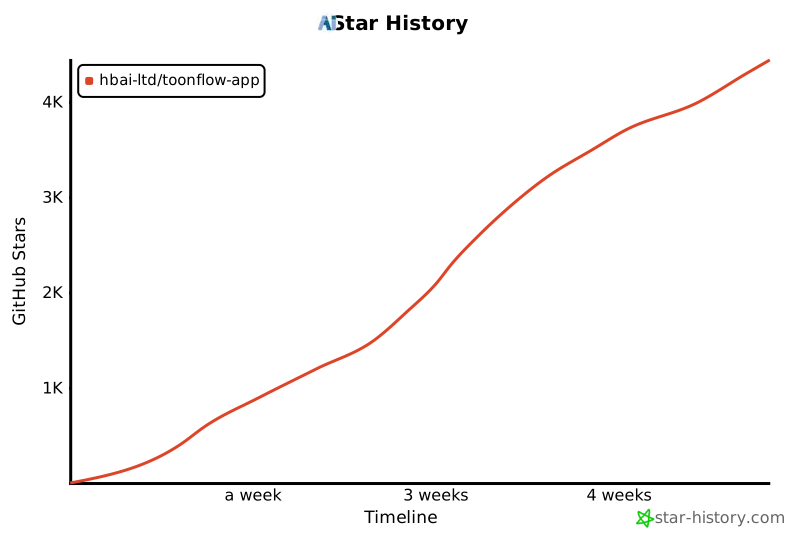](https://www.star-history.com/#HBAI-Ltd/Toonflow-app&type=timeline&legend=top-left)
|
||
|
||
---
|
||
|
||
|
||
# 🙏 謝辞
|
||
|
||
Toonflow に強力なサポートを提供してくださる以下のオープンソースプロジェクトに感謝いたします:
|
||
|
||
- [Express](https://expressjs.com/) - 高速でオープン、ミニマルな Node.js Web フレームワーク
|
||
- [AI SDK](https://ai-sdk.dev/) - TypeScript 向け AI ツールキット
|
||
- [Better-SQLite3](https://github.com/WiseLibs/better-sqlite3) - 高性能 SQLite3 バインディングライブラリ
|
||
- [Sharp](https://sharp.pixelplumbing.com/) - 高性能 Node.js 画像処理ライブラリ
|
||
- [Axios](https://axios-http.com/) - Promise ベースの HTTP クライアント
|
||
- [Zod](https://zod.dev/) - TypeScript ファーストのスキーマ検証ライブラリ
|
||
- [Socket.IO](https://socket.io/) - リアルタイムの双方向イベント通信エンジン
|
||
- [Electron](https://www.electronjs.org/) - クロスプラットフォームデスクトップアプリ開発フレームワーク
|
||
- [Hugging Face Transformers](https://huggingface.co/docs/transformers.js) - ローカル ML 推論ライブラリ
|
||
|
||
Toonflow を支援してくださる以下の組織・団体・個人に感謝いたします:
|
||
|
||
<table>
|
||
<thead>
|
||
<tr>
|
||
<th align="center">Logo</th>
|
||
<th align="center">名前</th>
|
||
<th align="center">サポート種別</th>
|
||
<th>説明</th>
|
||
<th align="center">公式サイト</th>
|
||
</tr>
|
||
</thead>
|
||
<tbody>
|
||
<tr>
|
||
<td align="center"><img src="./sponsored/sophnet.png" alt="Sophnet Logo" width="48"></td>
|
||
<td align="center"><b>算能雲 (Sophnet)</b></td>
|
||
<td align="center">💻 計算リソース提供</td>
|
||
<td>より高速・安定・低コストなワンストップモデル推論 API サービスプラットフォームの構築に取り組んでいます</td>
|
||
<td align="center"><a href="https://www.sophnet.com/">公式サイト</a></td>
|
||
</tr>
|
||
<tr>
|
||
<td align="center"><img src="./sponsored/atlascloud.png" alt="Atlas Cloud Logo" width="48"></td>
|
||
<td align="center"><b>Atlas Cloud</b></td>
|
||
<td align="center">💻 計算リソース提供</td>
|
||
<td>世界初のオムニモーダル推論プラットフォーム。チャット・画像・動画・音声すべてを統一 API で。300+ モデル、OpenAI 互換。</td>
|
||
<td align="center"><a href="https://www.atlascloud.ai/">公式サイト</a></td>
|
||
</tr>
|
||
<tr>
|
||
<td align="center"><img src="./sponsored/hunyuan.webp" alt="Tencent Hunyuan3D Logo" width="48"></td>
|
||
<td align="center"><b>Tencent Hunyuan3D</b></td>
|
||
<td align="center">🌐 世界モデル技術サポート</td>
|
||
<td>Tencent Hunyuan3D AIクリエイションエンジンはTencent Hunyuan3D生成モデル v2.5 をベースにした業界初のオールインワン3DコンテンツAI創作プラットフォームです。テキスト→3D、画像→3D、3Dアニメーション生成、テクスチャ生成、スケッチ→3D、3Dキャラクター生成に対応し、ローポリモデル生成に優れています。</td>
|
||
<td align="center"><a href="https://3d.hunyuan.tencent.com/">公式サイト</a></td>
|
||
</tr>
|
||
</tbody>
|
||
</table>
|
||
|
||
完全なサードパーティの依存関係リストについては `NOTICES.txt` をご参照ください。
|
||
|
||
##### copyright © Beijing AIA Network Technology Co., Ltd.
|
||
|
||
<img src="https://capsule-render.vercel.app/api?type=waving&color=gradient&customColorList=6,11,20&height=100§ion=footer" width="100%"/> |